Desktop Virtualization Software: Powering the Modern Digital Workspace
As organizations shift toward remote work, global collaboration, and cloud-first strategies, the traditional model of managing physical desktop computers is rapidly becoming outdated. Maintaining individual machines, securing distributed endpoints, and supporting diverse devices create complexity that slows down IT operations and increases risk. Desktop virtualization software has emerged as a transformative solution, enabling businesses to deliver secure, centralized desktop environments to users anywhere in the world.
Rather than being limited to a single device in a physical office, a user’s desktop can now exist as a virtual environment hosted in a data center or cloud platform. This shift is not merely technical; it represents a fundamental rethinking of how digital workspaces are delivered, managed, and secured.
Desktop Virtualization Software
What Is Desktop Virtualization?
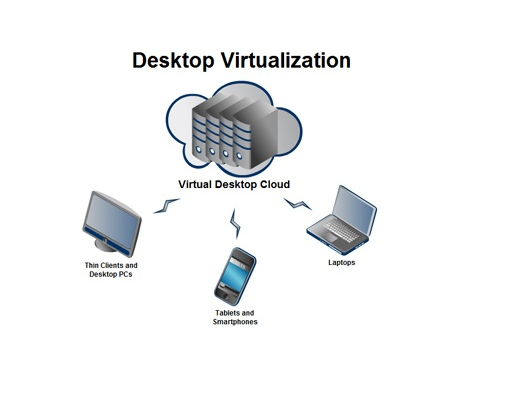
Desktop virtualization is a technology that separates the desktop environment — including the operating system, applications, and user data — from the physical device used to access it. Instead of running directly on a local PC, the desktop operates on a centralized server infrastructure and is streamed to end-user devices over a network.
This approach enables users to access a consistent desktop experience from laptops, thin clients, tablets, or even web browsers. The user interacts with a remote desktop as if it were local, while all processing, storage, and security controls remain in the centralized environment.
Desktop virtualization software acts as the orchestration layer that provisions virtual desktops, manages user sessions, allocates resources, and ensures secure connectivity between users and their virtual environments.
Desktop Virtualization Software
Core Architecture of Desktop Virtualization Software
At the heart of desktop virtualization lies a centralized infrastructure composed of hypervisors, management servers, storage systems, and networking components. The hypervisor allows multiple virtual machines (VMs) to run on shared physical hardware. Each VM can host an individual desktop operating system such as Windows or Linux.
Management platforms coordinate the lifecycle of these virtual desktops, handling provisioning, updates, monitoring, and policy enforcement. Connection brokers authenticate users and direct them to their assigned desktops, ensuring a seamless and secure experience.
Advanced desktop virtualization solutions also include profile management, application layering, and GPU virtualization to support graphics-intensive workloads. Together, these components create a scalable and high-performance virtual desktop environment capable of supporting thousands of users.
Desktop Virtualization Software
Types of Desktop Virtualization
Desktop virtualization software supports different deployment models tailored to organizational needs. One of the most common is Virtual Desktop Infrastructure (VDI), where each user receives a dedicated virtual machine. This approach offers a personalized experience and strong isolation between users, making it suitable for enterprises with strict security or customization requirements.
Another model is Remote Desktop Session Hosting (RDSH), where multiple users share sessions on a single server operating system. This model is more resource-efficient and cost-effective but provides less personalization.
Cloud-based Desktop as a Service (DaaS) represents a modern evolution of desktop virtualization. In this model, cloud providers host the entire desktop environment, reducing the need for on-premises infrastructure and allowing rapid scaling across geographic regions.
Key Features of Desktop Virtualization Software
Professional desktop virtualization platforms include a rich set of features designed to optimize performance, security, and manageability. Centralized image management allows IT teams to maintain standardized desktop templates that can be updated once and deployed to thousands of users. This ensures consistency and simplifies patch management.
Dynamic resource allocation enables systems to adjust CPU, memory, and storage based on user demand. High-performance protocols optimize the delivery of graphics, audio, and video, ensuring a smooth user experience even over low-bandwidth connections.
Security features such as multi-factor authentication, encrypted connections, and endpoint posture checks protect sensitive data. Since information remains in the data center or cloud rather than on local devices, the risk of data loss from stolen or compromised endpoints is significantly reduced.
Desktop Virtualization Software
Leading Desktop Virtualization Software Platforms
Several enterprise-grade platforms dominate the desktop virtualization landscape. VMware Horizon is widely recognized for its scalability and integration with VMware’s virtualization ecosystem. It supports both on-premises VDI and cloud-hosted deployments, making it a flexible solution for hybrid environments.
Citrix Virtual Apps and Desktops is another industry leader known for its advanced display technology and performance optimization. Citrix solutions are often used in sectors requiring high graphics performance and global access, such as healthcare, engineering, and finance.
Microsoft Azure Virtual Desktop offers a cloud-native desktop virtualization solution tightly integrated with the Microsoft ecosystem. It allows organizations to deploy Windows desktops and applications directly from Azure, simplifying management for businesses already using Microsoft services.
These platforms differ in architecture, licensing models, and integration capabilities, but they all aim to deliver secure and scalable virtual desktop experiences.
Desktop Virtualization Software
Benefits for IT Operations
Desktop virtualization dramatically simplifies IT operations by centralizing desktop management. Instead of maintaining hundreds or thousands of individual PCs, IT teams manage a smaller number of master images and server resources. This reduces hardware dependency, shortens deployment times, and lowers support costs.
Provisioning a new employee’s desktop can take minutes rather than days. Updates and patches are applied centrally, ensuring all users benefit immediately without manual intervention on each device. Troubleshooting becomes easier as IT staff can access virtual desktops directly within the data center environment.
Disaster recovery and business continuity are also enhanced. Since desktops are hosted centrally, they can be backed up and restored quickly, and users can reconnect from alternative locations if offices become inaccessible.
Desktop Virtualization Software
Enhancing Security Through Centralization
Security is one of the strongest arguments for adopting desktop virtualization software. Traditional PCs store sensitive data locally, making them vulnerable to theft, malware, and unauthorized access. Virtual desktops, by contrast, keep data within secure data centers or cloud environments protected by enterprise-grade controls.
Centralized monitoring allows security teams to track user activity, enforce compliance policies, and respond quickly to incidents. Network segmentation, role-based access control, and automated patching reduce exposure to vulnerabilities.
Additionally, virtual desktops can be configured with restricted permissions that prevent data transfer to local devices, reducing the risk of insider threats or accidental data leaks.
Supporting Remote and Hybrid Workforces
The global shift toward remote and hybrid work has accelerated demand for desktop virtualization. Employees no longer need high-powered corporate laptops; they can access their full desktop environment securely from personal devices or thin clients.
This flexibility allows organizations to onboard remote workers quickly and maintain consistent security standards regardless of location. Virtual desktops also improve performance for globally distributed teams by allowing workloads to run closer to data sources in regional data centers.
By decoupling work environments from physical offices, desktop virtualization supports a more agile and resilient workforce.
Desktop Virtualization Software
Performance Considerations and Optimization
Delivering a seamless virtual desktop experience requires careful performance planning. Desktop virtualization software uses advanced display protocols that compress and stream screen updates efficiently. Adaptive technologies adjust image quality and bandwidth usage based on network conditions.
For users running graphics-intensive applications, GPU virtualization allows multiple virtual desktops to share physical graphics processing units. This capability is essential for industries such as design, engineering, and media production.
Storage optimization techniques like deduplication and caching reduce latency and improve load times. These performance enhancements ensure that virtual desktops can rival or even surpass the responsiveness of physical machines.
Desktop Virtualization Software
Cost Implications and ROI
While desktop virtualization requires initial investment in infrastructure or cloud services, it often delivers long-term cost savings. Reduced hardware refresh cycles, lower energy consumption, and streamlined management decrease operational expenses.
Thin clients and repurposed devices extend hardware lifespans, and centralized management reduces the need for on-site IT support. Subscription-based DaaS models also convert capital expenses into predictable operating costs, improving financial flexibility.
When combined with productivity gains from improved uptime and faster onboarding, desktop virtualization can offer a compelling return on investment.
Challenges and Considerations
Despite its advantages, desktop virtualization is not without challenges. Initial setup can be complex, requiring careful capacity planning and network optimization. Licensing models may also be intricate, particularly when combining operating systems, virtualization software, and cloud services.
User experience depends heavily on network quality, and poorly configured environments can lead to latency or performance issues. Organizations must also ensure that their IT teams have the skills needed to manage virtual infrastructure effectively.
Addressing these challenges requires strategic planning, proper training, and ongoing monitoring.
Desktop Virtualization Software
The Future of Desktop Virtualization
The future of desktop virtualization is closely tied to cloud innovation and edge computing. As 5G networks expand and cloud regions grow, virtual desktops will deliver even lower latency and higher performance.
Artificial intelligence is expected to play a role in predictive resource allocation, automatically optimizing workloads and preventing performance bottlenecks. Integration with zero-trust security frameworks will further enhance protection in distributed work environments.
Ultimately, desktop virtualization will continue evolving into a seamless digital workspace platform that blends cloud services, security, and user experience into a unified solution.
Desktop Virtualization Software
Conclusion
Desktop virtualization software has transformed how organizations deliver, secure, and manage digital work environments. By centralizing desktops in data centers or the cloud, businesses gain greater control, stronger security, and improved flexibility for remote and hybrid workforces.
While implementation requires thoughtful planning, the long-term benefits in efficiency, scalability, and resilience make desktop virtualization a foundational technology for the modern enterprise. As digital transformation accelerates, virtual desktops are no longer an alternative to physical PCs — they are rapidly becoming the standard for the future of work.