Diagram of Cloud Deployment Model: Understanding the Structure and Types of Cloud Environments
In today’s digital-first world, cloud computing has revolutionized the way organizations manage, store, and deploy their data and applications. However, before implementing a cloud-based strategy, it’s essential to understand the different cloud deployment models — and how they are represented through a diagram of cloud deployment model.
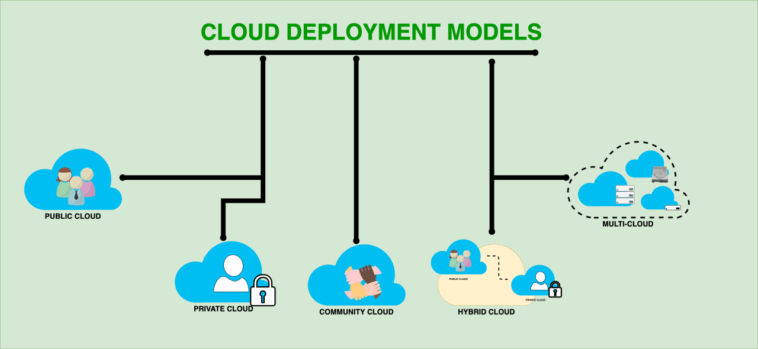
This diagram serves as a visual map showing how various deployment models—public, private, hybrid, and community clouds—connect users, infrastructure, and services. In this article, we’ll break down the key components of cloud deployment models, interpret what a typical diagram of cloud deployment model looks like, and explain how each model fits different business needs.
What Is a Cloud Deployment Model?
A cloud deployment model defines how cloud services are structured, managed, and made available to users. It determines where data is stored, who manages the infrastructure, and how resources are accessed.
Each deployment model offers unique advantages in terms of cost, scalability, security, and control. Choosing the right model depends on a company’s strategic goals, compliance requirements, and technical infrastructure.
A diagram of cloud deployment model visually explains the relationship between users, service providers, and infrastructure layers. It helps stakeholders quickly grasp how data flows between the cloud and the end users, and how resources are shared or isolated.
Key Components in a Cloud Deployment Model Diagram
When analyzing a diagram of cloud deployment model, you’ll usually find the following core components:
Cloud Service Providers (CSPs) – These are the companies or platforms that manage the physical servers, storage, and networking (e.g., AWS, Microsoft Azure, Google Cloud).
Users/Clients – Individuals or organizations that access cloud resources via the internet.
Applications and Services – Software, virtual machines, and databases hosted on the cloud infrastructure.
Networks and Connectivity – The internet or private connections that link the cloud infrastructure with users.
Security Layers – Firewalls, encryption, and authentication systems that protect data within and across clouds.
These components are connected in different configurations depending on the deployment model — whether it’s public, private, hybrid, or community cloud.
1. Public Cloud Deployment Model
In a diagram of a public cloud deployment model, you would typically see multiple users (tenants) accessing resources from a single large cloud infrastructure managed entirely by a third-party provider.
Characteristics:
Ownership: Managed by external providers like Amazon Web Services (AWS), Google Cloud, or Microsoft Azure.
Accessibility: Available to anyone with an internet connection.
Cost Model: Pay-as-you-go pricing; users pay only for what they use.
Example Scenario:
A startup uses the public cloud to host its web application without worrying about hardware maintenance or scalability.
Visual Representation:
In the diagram of cloud deployment model, the public cloud is usually shown as a large shared infrastructure connected to multiple clients through the internet, illustrating how various organizations share computing resources.
2. Private Cloud Deployment Model
A private cloud is designed for a single organization, offering more control and security.
Characteristics:
Ownership: Managed internally or by a third party but used exclusively by one organization.
Accessibility: Restricted to authorized users only.
Security: High level of security and compliance — suitable for industries like finance, healthcare, and government.
Example Scenario:
A bank operates a private cloud to store customer data securely and meet compliance requirements such as GDPR or HIPAA.
Diagram Explanation:
In a diagram of cloud deployment model, the private cloud is often represented as a dedicated infrastructure isolated from other environments. It connects only to internal users or through a secure VPN tunnel.
3. Hybrid Cloud Deployment Model
The hybrid cloud combines public and private clouds to leverage the strengths of both.
Characteristics:
Ownership: A mix of on-premises private cloud and third-party public cloud.
Flexibility: Data and applications can move seamlessly between environments.
Use Case: Ideal for businesses with variable workloads or data that must remain partially on-premise.
Example Scenario:
An enterprise stores sensitive data on a private cloud while using the public cloud for large-scale data analytics or testing environments.
Diagram Explanation:
In the diagram of cloud deployment model, the hybrid cloud is shown as two interconnected systems — one private and one public — linked through a secure network bridge or API integration. This demonstrates the data flow between both environments.
4. Community Cloud Deployment Model
A community cloud is a shared infrastructure for organizations with common goals or compliance requirements.
Characteristics:
Ownership: Shared by several organizations (e.g., government agencies or educational institutions).
Cost Sharing: Costs are distributed among participants.
Security: Better than public cloud but less restrictive than private cloud.
Example Scenario:
Several universities create a shared cloud to host research data accessible only to approved faculty and researchers.
Diagram Explanation:
In a diagram of cloud deployment model, the community cloud is represented as a shared infrastructure with controlled access for specific organizations — a middle ground between private and public models.
Comparing the Four Deployment Models
| Feature | Public Cloud | Private Cloud | Hybrid Cloud | Community Cloud |
|---|---|---|---|---|
| Ownership | Third-party provider | Single organization | Shared (private + public) | Group of organizations |
| Security | Moderate | High | High | Medium-high |
| Cost | Low (shared) | High (dedicated) | Medium | Medium |
| Scalability | Very high | Limited by internal resources | High | Moderate |
| Use Case | Startups, developers, SaaS | Enterprises, banks | Large corporations | Research groups, government |
This comparison table complements the diagram of cloud deployment model, helping visualize which type of cloud environment fits your business structure.
Benefits of Understanding the Cloud Deployment Model Diagram
A well-designed diagram of cloud deployment model isn’t just a visual reference—it’s a strategic tool. Here’s why it matters:
Clear Visualization: It helps IT managers understand how data, users, and services interact within the cloud ecosystem.
Improved Decision-Making: Companies can identify the most suitable model based on security, compliance, and cost requirements.
Enhanced Communication: It bridges the gap between technical and non-technical stakeholders, simplifying complex architectures.
Efficient Planning: Visual diagrams help plan hybrid migrations or multi-cloud integrations effectively.
How to Create a Diagram of Cloud Deployment Model
To design a professional diagram of cloud deployment model, you can use tools like Lucidchart, Draw.io, Microsoft Visio, or Canva.
Follow these steps:
Define your deployment model (public, private, hybrid, or community).
Identify users, data centers, and network connections.
Use labeled icons to represent each component (servers, firewalls, users, data storage).
Indicate communication paths and data flows with arrows.
Add color coding to distinguish between environments (e.g., blue for public cloud, gray for private cloud).
A clear and accurate diagram helps stakeholders visualize your cloud strategy instantly.
Conclusion
Understanding a diagram of cloud deployment model is crucial for any organization planning its move to the cloud. The diagram visually simplifies the differences between public, private, hybrid, and community clouds—showing how data, users, and infrastructure connect in each case.
Whether you’re designing a scalable system for a startup or building a secure environment for an enterprise, choosing the right deployment model ensures efficiency, compliance, and long-term flexibility.
By interpreting and applying the diagram of cloud deployment model, businesses can make smarter decisions and unlock the full potential of cloud computing in the modern digital landscape.