Example of SaaS
In the modern digital era, Software as a Service (SaaS) has become one of the most significant innovations in cloud computing. SaaS allows users to access software applications over the internet without the need to install, maintain, or manage them on local devices. This model has transformed how businesses, organizations, and individuals use software, making it easier, faster, and more cost-effective. In this article, we will explore the concept of SaaS, provide examples of popular SaaS applications, discuss its benefits and challenges, and analyze why SaaS is revolutionizing the software industry.
Example of SaaS
What is SaaS?
Software as a Service (SaaS) is a cloud computing model where software applications are delivered over the internet as a subscription service. Instead of purchasing software licenses and installing them on individual computers, users can access the software through a web browser or a dedicated application. The SaaS provider manages everything, including servers, storage, security, updates, and performance.
SaaS differs from traditional software models because it eliminates the need for complex installation processes, regular updates, and infrastructure management. This makes SaaS ideal for businesses looking for efficiency, scalability, and reduced operational costs.
Example of SaaS
Key Characteristics of SaaS
SaaS applications have several unique features that distinguish them from traditional software:
Cloud-Based Access: SaaS applications are hosted on the cloud and can be accessed from any device with an internet connection.
Subscription Pricing: Most SaaS products operate on a monthly or yearly subscription model, reducing upfront costs.
Automatic Updates: Users always have access to the latest features and security updates without manual intervention.
Multi-Tenancy: A single instance of the software can serve multiple users or organizations while keeping data secure and separate.
Scalability: SaaS solutions can easily scale to accommodate more users or higher workloads.
Accessibility: With SaaS, teams can collaborate in real-time from different locations, making it ideal for remote work and global organizations.
Example of SaaS
Examples of SaaS
To understand SaaS better, let’s explore some popular examples widely used across various industries:
Example of SaaS
1. Google Workspace (G Suite)
Google Workspace, formerly known as G Suite, is a comprehensive suite of productivity tools, including Gmail, Google Docs, Google Sheets, Google Slides, and Google Drive. Users can collaborate in real-time, share documents, and communicate effectively without installing software on their devices.
Use Case: Businesses, educational institutions, and remote teams use Google Workspace for email communication, document collaboration, and cloud storage.
Example of SaaS
2. Salesforce
Salesforce is a leading Customer Relationship Management (CRM) platform that helps businesses manage sales, customer service, marketing, and analytics. Salesforce operates entirely on the cloud, allowing businesses to track leads, manage customer relationships, and improve marketing campaigns without maintaining on-premise servers.
Use Case: Sales teams, marketing departments, and customer support teams rely on Salesforce to enhance customer engagement and streamline workflows.
Example of SaaS
3. Zoom
Zoom is a cloud-based video conferencing platform that enables virtual meetings, webinars, and online training. It gained immense popularity during the rise of remote work, providing a seamless communication experience with video, audio, and screen-sharing capabilities.
Use Case: Businesses, educators, and event organizers use Zoom for remote meetings, online classes, and virtual conferences.
Example of SaaS
4. Slack
Slack is a cloud-based collaboration tool that integrates messaging, file sharing, and workflow management. Teams can communicate in real-time, create channels for specific projects, and integrate with other SaaS tools like Google Drive, Trello, and Jira.
Use Case: Teams in technology companies, startups, and enterprises use Slack for project communication and team collaboration.
5. Dropbox
Dropbox is a cloud storage service that allows users to store files, share documents, and collaborate on projects. It eliminates the need for physical storage devices and enables access to files from anywhere.
Use Case: Individuals and businesses use Dropbox for file backup, sharing, and collaborative document management.
Example of SaaS
Benefits of SaaS
SaaS offers multiple advantages that make it attractive to businesses and individuals:
Cost Efficiency: SaaS eliminates the need for expensive hardware, software licenses, and IT maintenance costs.
Ease of Use: Users can start using SaaS applications immediately without installation or configuration.
Automatic Updates: Continuous updates ensure users have access to the latest features and security patches.
Accessibility: SaaS applications can be accessed from anywhere, promoting remote work and flexibility.
Scalability: Organizations can easily scale subscriptions to match growth and changing needs.
Collaboration: SaaS enables real-time collaboration, making teamwork more efficient and productive.
Example of SaaS
Challenges of SaaS
While SaaS offers many benefits, it also comes with some challenges:
Internet Dependency: SaaS applications require a stable internet connection to function efficiently.
Data Security: Storing data in the cloud can raise concerns about privacy and security, especially for sensitive information.
Limited Customization: Some SaaS products may offer limited options for customization compared to on-premise software.
Vendor Lock-In: Switching providers can be challenging due to data migration complexities and reliance on a specific platform.
Performance: SaaS performance may be affected by network issues, server downtime, or high traffic.
Example of SaaS
SaaS vs Traditional Software
| Feature | SaaS | Traditional Software |
|---|---|---|
| Installation | No installation required | Installed on individual devices |
| Updates | Automatic updates | Manual updates |
| Cost | Subscription-based | One-time purchase |
| Accessibility | Accessible from any device with internet | Limited to installed device |
| Maintenance | Provider-managed | User-managed |
Trends in SaaS
The SaaS industry is continuously evolving, driven by technological advancements and business needs. Some current trends include:
AI Integration: SaaS platforms are incorporating AI for predictive analytics, chatbots, and workflow automation.
Industry-Specific SaaS: Solutions tailored for healthcare, finance, education, and retail are gaining popularity.
Low-Code/No-Code Platforms: SaaS tools now allow non-developers to create applications without coding knowledge.
Mobile SaaS Applications: Increasing mobile access ensures SaaS apps are functional on smartphones and tablets.
Enhanced Security: Providers are focusing on advanced encryption, multi-factor authentication, and compliance with regulations like GDPR and HIPAA.
Example of SaaS
Conclusion
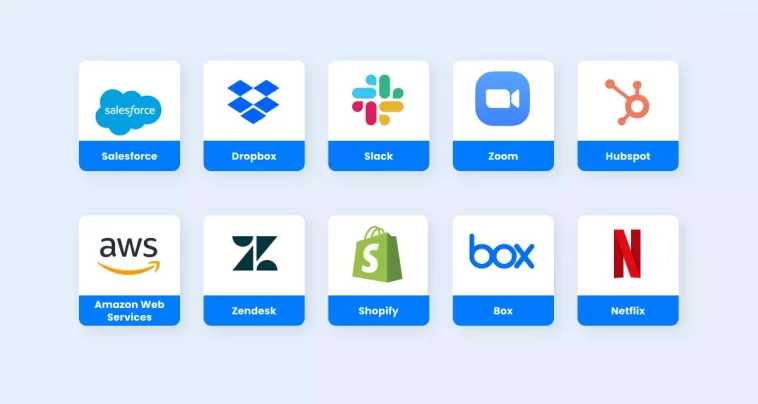
Understanding the example of SaaS is crucial for businesses, developers, and individuals aiming to leverage cloud computing efficiently. SaaS applications such as Google Workspace, Salesforce, Zoom, Slack, and Dropbox have transformed how we work, communicate, and manage data. By offering cost efficiency, accessibility, scalability, and collaboration features, SaaS continues to redefine the software landscape.
Despite challenges like internet dependency and security concerns, the benefits of SaaS far outweigh the drawbacks, making it a preferred choice for modern organizations. As technology evolves, SaaS is expected to become even more innovative, integrated, and essential for businesses of all sizes.