How Does Virtual Desktop Work : Understanding VDI Technology
How Does Virtual Desktop Work
In the era of remote work and digital transformation, one term continues to emerge in IT conversations — Virtual Desktop Infrastructure (VDI). Companies worldwide are shifting from traditional desktop setups to virtual environments that are flexible, secure, and scalable. Yet, a common question remains: how does virtual desktop work?
This article provides a clear and structured explanation of how virtual desktop technology operates, its components, benefits, and use cases. Whether you are an IT professional, a business owner, or a curious learner, this guide will help you understand how this technology shapes modern computing environments.
What Is a Virtual Desktop?
A virtual desktop is a digital version of a physical computer that runs in a virtualized environment hosted on a remote server or cloud infrastructure. Instead of storing applications, data, and operating systems on a local machine, users can access their desktop from anywhere through an internet connection.
For instance, when you log into a virtual desktop using a thin client or laptop, you are essentially connecting to a remote virtual machine (VM) that mimics the behavior of a real computer. This model is the foundation of Virtual Desktop Infrastructure (VDI).
How Does Virtual Desktop Work
Core Concept: How Does Virtual Desktop Work?
To understand how virtual desktop works, imagine your physical PC split into three parts:
The hardware (CPU, memory, storage)
The operating system (Windows, Linux, etc.)
The applications and files
In a virtual desktop system, all these elements are hosted and managed on a centralized data center or cloud platform. Users connect to their virtual desktops via a network connection using a client device (which can be a PC, tablet, or even a smartphone).
Here’s the simplified workflow of how it works:
Virtualization Layer:
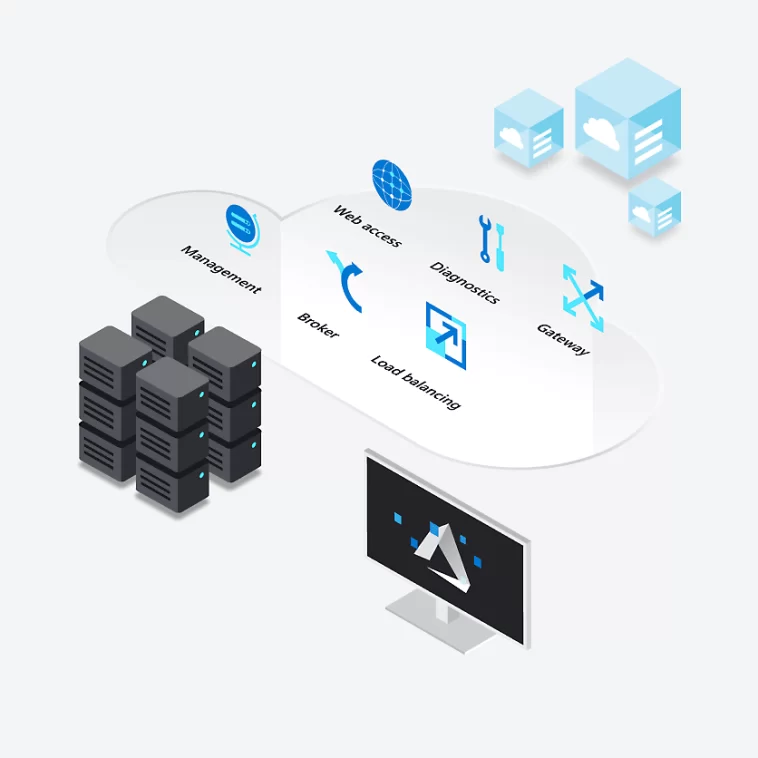
The organization’s IT team creates virtual machines (VMs) on a hypervisor (like VMware vSphere, Microsoft Hyper-V, or Citrix Hypervisor). Each VM acts as an independent desktop environment with its own OS and resources.Connection Broker:
When a user logs in, a connection broker verifies their credentials and directs them to the correct virtual machine.Remote Display Protocol (RDP/HDX/PCoIP):
The user interface of the desktop (graphics, keyboard, mouse inputs) is transmitted through a remote display protocol, ensuring that the actual processing happens in the data center, not on the local device.Data Storage and Management:
User profiles, settings, and files are stored centrally, allowing consistent access from any device.Access via Client Device:
The user interacts with their desktop as if it were local, even though all operations happen remotely in a secure, virtualized environment.
How Does Virtual Desktop Work
Main Components of Virtual Desktop Infrastructure
A Virtual Desktop Infrastructure (VDI) setup typically includes the following components:
Hypervisor: Manages virtual machines and allocates computing resources (CPU, RAM, storage).
Connection Broker: Authenticates users and connects them to their assigned virtual desktops.
Virtual Machines (VMs): Each VM represents a user’s virtual desktop environment.
Storage System: Centralized data storage ensures data consistency and recovery.
Display Protocol: Enables real-time transmission of the desktop screen to the user device.
Client Devices: Laptops, thin clients, tablets, or mobile devices used to access the virtual desktop.
Types of Virtual Desktop Deployments
There are mainly two deployment models for virtual desktops:
1. Persistent VDI
Each user has a dedicated desktop that saves all changes, settings, and customizations. It’s like having your personal workstation in the cloud.
Best for: Developers, designers, or users who need consistent environments.
2. Non-Persistent VDI
Every time the user logs out, the desktop resets to its original state. This approach simplifies maintenance and reduces storage needs.
Best for: Call centers, temporary workers, and training labs.
How Does Virtual Desktop Work in the Cloud?
Cloud-based virtual desktops operate similarly to traditional VDI but rely on cloud providers like Microsoft Azure Virtual Desktop (AVD), Amazon WorkSpaces, or Google Cloud Virtual Desktops.
Here’s how it functions in a cloud environment:
The cloud provider hosts the infrastructure and servers.
Users connect through a secure gateway using credentials.
The cloud platform provisions a virtual machine on demand.
Users access their workspace via a web browser or desktop app.
All data is stored securely in the cloud, ensuring flexibility and scalability.
This approach eliminates the need for organizations to maintain on-premises servers, lowering operational costs and increasing agility.
How Does Virtual Desktop Work
Advantages of Using Virtual Desktops
Implementing virtual desktops offers several significant benefits:
Enhanced Security:
Data never leaves the data center. Even if a device is lost, sensitive information remains protected.Flexibility and Mobility:
Employees can access their desktops from anywhere in the world.Cost Efficiency:
Reduces hardware expenses and simplifies IT management.Centralized Management:
Administrators can update software or apply security patches from a single console.Scalability:
Virtual desktops can be scaled up or down based on workforce demand.Business Continuity:
Cloud-hosted desktops ensure minimal disruption during disasters or outages.
How Does Virtual Desktop Work
Challenges and Considerations
While virtual desktops offer many advantages, they also come with challenges:
Initial Setup Cost:
Implementing VDI can require a high upfront investment for servers and licensing.Network Dependence:
Performance relies heavily on internet connectivity and bandwidth.Complexity:
Requires skilled IT professionals for setup, monitoring, and optimization.User Experience:
Poor network conditions can affect responsiveness and latency.
To overcome these issues, organizations often opt for managed VDI services or cloud-based solutions that reduce technical complexity.
Use Cases of Virtual Desktop Technology
Virtual desktops are widely used across industries for various purposes:
Remote Work & Hybrid Offices:
Employees can securely access corporate desktops from home.Education:
Students access learning software without needing powerful local machines.Healthcare:
Doctors can securely view patient data across hospitals.Finance & Banking:
Virtual desktops ensure compliance and secure access to financial systems.Software Development:
Developers can use consistent, isolated environments for testing and coding.
How Does Virtual Desktop Work
Future of Virtual Desktops
As cloud computing and AI continue to evolve, virtual desktop solutions will become even more efficient. The integration of GPU virtualization, AI-based resource optimization, and 5G connectivity will make remote desktop experiences faster and more realistic.
With sustainability and remote collaboration at the forefront, virtual desktops are expected to become the standard for modern digital workplaces.
How Does Virtual Desktop Work
Conclusion
Understanding how virtual desktop works is key to realizing its transformative impact on modern business operations. By hosting desktops on centralized or cloud-based servers, organizations achieve enhanced security, flexibility, and scalability while reducing costs.
As more companies transition to hybrid and remote work models, Virtual Desktop Infrastructure (VDI) stands out as one of the most efficient solutions for managing digital workspaces securely and seamlessly.
In short, the next time someone asks, “How does virtual desktop work?” — the answer is simple: it brings your entire computer environment to the cloud, ready to access anytime, anywhere.