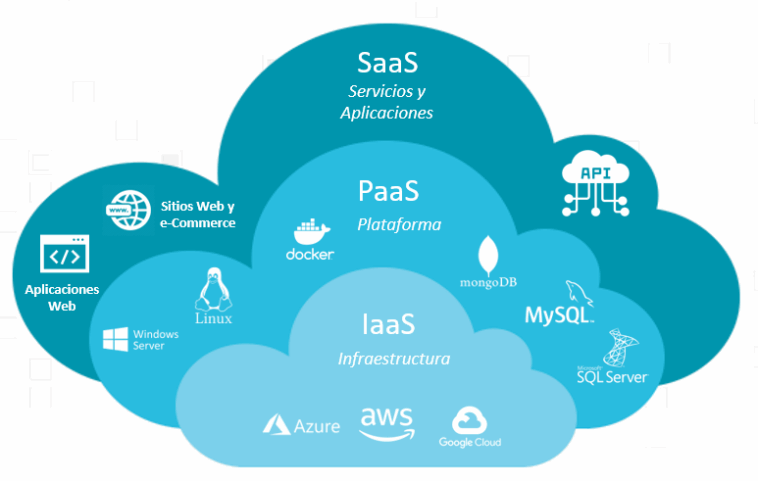
IaaS vs PaaS vs SaaS Diagram
In the rapidly evolving world of cloud computing, organizations rely on different service models to streamline operations, improve scalability, reduce infrastructure costs, and accelerate innovation. The three dominant service models—Infrastructure as a Service (IaaS), Platform as a Service (PaaS), and Software as a Service (SaaS)—each provide unique features and levels of control. Understanding their differences is essential for businesses choosing the right cloud strategy.
In this article, we explore IaaS vs PaaS vs SaaS, supported by a conceptual diagram to help visualize their structure and relationship. The explanation is written in an academic yet accessible style, and optimized for the keyword “IaaS vs PaaS vs SaaS diagram.”
IaaS vs PaaS vs SaaS Diagram
What Are Cloud Service Models?
Cloud service models define how organizations consume computing resources, ranging from raw infrastructure to fully managed software applications. Each model delivers value depending on the level of control, flexibility, and responsibility the customer needs.
Before diving into comparisons, let’s define each model clearly.
Infrastructure as a Service (IaaS)
IaaS provides organizations with virtualized computing resources over the internet. Instead of purchasing physical hardware, companies rent infrastructure such as servers, storage, networks, and virtualization layers.
Key Characteristics of IaaS
On-demand computing resources
High scalability
Full control over operating systems and applications
Pay-as-you-go pricing
Ideal for IT teams that want flexibility without physical hardware
Examples of IaaS
Amazon EC2 (AWS)
Google Compute Engine (GCP)
Microsoft Azure Virtual Machines
DigitalOcean Droplets
When to Use IaaS
Hosting enterprise applications
Building custom environments
Backup and recovery systems
Big data and analytics workloads
Startups scaling infrastructure rapidly
IaaS vs PaaS vs SaaS Diagram
Platform as a Service (PaaS)
PaaS provides a managed platform that includes hardware, operating systems, middleware, and development tools. Developers use PaaS to build, test, deploy, and manage applications without worrying about underlying infrastructure.
Key Characteristics of PaaS
Ready-to-use development environments
Built-in tools (APIs, databases, frameworks)
Automated updates and maintenance
Reduces operational complexity
Supports rapid application development
Examples of PaaS
Google App Engine
AWS Elastic Beanstalk
Microsoft Azure App Services
Heroku
When to Use PaaS
Developing cloud-native apps
Quickly delivering prototypes
Minimizing infrastructure overhead
Teams without system admin resources
Automated CI/CD pipelines
IaaS vs PaaS vs SaaS Diagram
Software as a Service (SaaS)
SaaS delivers fully managed software applications over the internet. Users access the app through browsers or mobile apps, without installing or maintaining software or hardware.
Key Characteristics of SaaS
Ready-made applications
Zero installation or configuration
Automatic updates and security management
Subscription-based pricing
Accessible from anywhere
Examples of SaaS
Google Workspace
Microsoft 365
Salesforce
Dropbox
Slack
When to Use SaaS
Email, communication, CRM, HR systems
Organizations needing quick deployment
Minimal IT involvement
Subscription-based application usage
IaaS vs PaaS vs SaaS Diagram
IaaS vs PaaS vs SaaS: Side-by-Side Comparison
To understand these service models better, it helps to compare them across various dimensions.
1. Control
| Layer | IaaS | PaaS | SaaS |
|---|---|---|---|
| Infrastructure | Provider | Provider | Provider |
| OS & Runtime | Customer | Provider | Provider |
| Application | Customer | Customer | Provider |
| Data | Customer | Customer | Provider |
IaaS gives the user maximum control, while SaaS gives the least.
2. Responsibility Distribution
IaaS: Users manage operating systems, apps, and data.
PaaS: Users manage applications and data.
SaaS: Users only manage app usage and internal data input.
3. Use Case Strengths
| Category | IaaS | PaaS | SaaS |
|---|---|---|---|
| App Hosting | ✓✓✓ | ✓✓ | ✓ |
| Development | ✓ | ✓✓✓ | ✗ |
| Business Use | ✓ | ✓ | ✓✓✓ |
| Customization | ✓✓✓ | ✓✓ | ✓ |
IaaS vs PaaS vs SaaS Diagram (Conceptual)
Below is a descriptive diagram that clearly visualizes the layers of each service model.
Conceptual Diagram Explanation
A simpler way to visualize the comparison:
This diagram helps users quickly understand how much responsibility each model requires and the level of abstraction provided.
IaaS vs PaaS vs SaaS Diagram
Detailed Analysis: IaaS vs PaaS vs SaaS
1. Flexibility
IaaS offers the highest level of flexibility because users can configure the environment exactly as they want. PaaS provides a balanced middle ground, while SaaS offers zero flexibility by design.
2. Deployment Speed
SaaS: Instant
PaaS: Fast
IaaS: Slower, requires configuration
Organizations choose the model based on their required deployment timeline.
3. Cost Structure
SaaS is usually subscription-based.
PaaS charges for platform usage.
IaaS charges for virtual machines, storage, and traffic.
Cost effectiveness depends on workload type.
4. Ideal Audience
IaaS: IT engineers, cloud architects, DevOps teams
PaaS: Developers and software teams
SaaS: Non-technical users, businesses needing ready-made tools
IaaS vs PaaS vs SaaS Diagram
Benefits of Understanding the Diagram
The concept of IaaS vs PaaS vs SaaS becomes significantly easier when visualized as a layered diagram because:
It clarifies responsibility boundaries
It shows abstraction levels
It helps with cloud strategy planning
It supports decision-making for digital transformation
It makes technical education more accessible
Organizations often use such diagrams when presenting cloud migration strategies or comparing service models for procurement decisions.
IaaS vs PaaS vs SaaS Diagram
Which Cloud Service Model Should You Choose?
Choose IaaS if:
You need full control over your infrastructure
You want to migrate legacy applications to the cloud
Your workloads require custom configurations
Choose PaaS if:
You want to accelerate app development
You prefer automated scaling and CI/CD tools
You don’t want to manage operating systems
Choose SaaS if:
You need ready-to-use applications
You want to reduce IT workload
You prefer predictable costs
Conclusion
The IaaS vs PaaS vs SaaS diagram provides a clear visual framework to understand the differences between the three major cloud service models. Each model serves a distinct purpose, targeting different organizational needs—from full control with IaaS, to streamlined development with PaaS, to convenience and accessibility with SaaS.
By understanding these layers and their responsibilities, businesses can make informed decisions, optimize cloud costs, and accelerate digital transformation initiatives.