Services of Cloud Computing
Cloud computing has evolved into one of the most transformative technologies of the digital era. It enables organizations to deliver computing resources on demand, scale applications globally, and reduce reliance on traditional on-premises infrastructure. At the core of this paradigm are the services of cloud computing, which define the various categories of resources that cloud providers offer to individuals, startups, and enterprises.
Understanding these cloud services is essential for designing modern applications, optimizing IT costs, and enhancing business agility. This article explores the structure, types, and real-world examples of cloud computing services in detail, while emphasizing their role in digital transformation.
Services of Cloud Computing
What Are the Services of Cloud Computing?
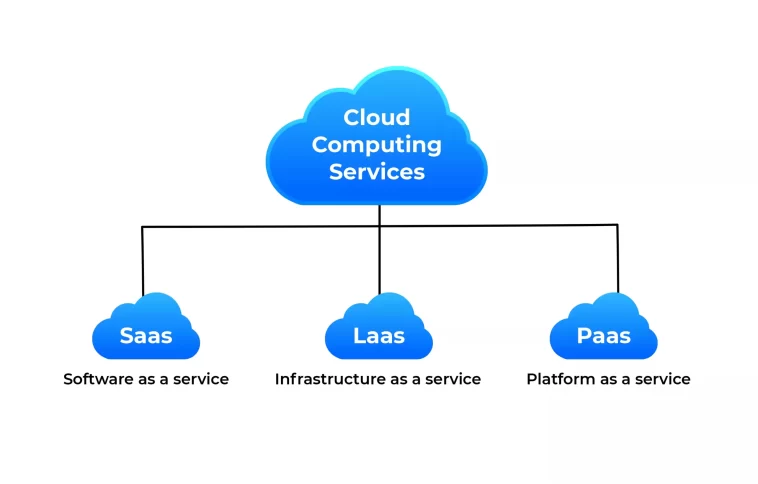
The services of cloud computing refer to the standardized categories through which cloud providers deliver computing power, storage, development tools, security, networking, analytics, and software applications over the internet. These services are typically grouped into three primary models:
IaaS – Infrastructure as a Service
PaaS – Platform as a Service
SaaS – Software as a Service
In addition, advanced service categories have emerged in recent years, such as FaaS (Function as a Service), DaaS (Desktop as a Service), and DBaaS (Database as a Service).
Cloud computing services allow users to consume resources on a pay-as-you-go basis, eliminating the need to purchase physical servers, install software manually, or maintain complex infrastructure.
Services of Cloud Computing
1. Infrastructure as a Service (IaaS)
Infrastructure as a Service is the foundational layer of cloud computing. It provides essential computing resources that can be provisioned and released on demand, including:
Virtual machines
Storage volumes
Load balancers
Networking components
Firewalls and security groups
Key Benefits of IaaS
Scalability: Resources can scale up or down depending on workload demand.
Cost Flexibility: Organizations pay only for what they use.
High Availability: Data centers are distributed globally.
Reduced Maintenance: Hardware lifecycle management is handled by the cloud provider.
Examples of IaaS
Amazon Web Services (AWS) EC2
Google Compute Engine (GCE)
Microsoft Azure Virtual Machines
DigitalOcean Droplets
IBM Cloud Infrastructure
Common Use Cases
Website hosting
Big data processing
Cloud-native development
Disaster recovery
High-performance computing (HPC)
IaaS is ideal for businesses seeking full control over operating systems, storage, and deployed applications without managing physical hardware.
2. Platform as a Service (PaaS)
Platform as a Service offers a cloud-hosted development environment that includes infrastructure, runtime environments, middleware, and tools needed for building applications.
PaaS abstracts away server and OS-level management, allowing developers to focus entirely on code, deployment, and automation.
Key Components of PaaS
Application runtimes (Java, Python, Node.js, PHP)
Managed databases
API management tools
Continuous integration/continuous deployment (CI/CD) services
Development frameworks
Benefits of PaaS
Rapid Development: Speeds up application creation through built-in tools.
Lower Operational Burden: Eliminates server configuration and management tasks.
Collaboration-Friendly: Teams can work together on shared cloud environments.
Automatic Scaling: Applications scale automatically based on load.
Examples of PaaS
AWS Elastic Beanstalk
Google App Engine
Microsoft Azure App Service
Heroku
Red Hat OpenShift
Use Cases for PaaS
Web application development
API creation
Automated testing and deployment
Container-based development (e.g., Kubernetes platforms)
PaaS empowers developers and startups to build applications quickly without worrying about backend complexities.
3. Software as a Service (SaaS)
Software as a Service provides fully managed applications that users can access through a browser or mobile app without installation, updates, or maintenance.
SaaS represents the highest-level cloud service model, delivering ready-to-use software over the internet.
Characteristics of SaaS
Subscription-based pricing
Automatic updates and patches
Multi-tenant architecture
High availability and reliability
Accessible from any device
Examples of SaaS
Google Workspace
Salesforce
Dropbox
Slack
HubSpot
Microsoft 365
Use Cases for SaaS
Collaboration tools
Customer relationship management (CRM)
Email and productivity suites
Accounting and ERP systems
Marketing automation
SaaS is ideal for businesses seeking convenience, predictable pricing, and minimal IT overhead.
Services of Cloud Computing
4. Additional Cloud Computing Service Categories
While the three main service models form the foundation of the cloud, new models have emerged to address specific computing needs.
4.1 Function as a Service (FaaS)
Also known as serverless computing, FaaS allows developers to run event-driven functions without managing servers.
Examples: AWS Lambda, Azure Functions, Google Cloud Functions
Benefits:
Automatic scaling
Event-driven architecture
Reduced cost for intermittent workloads
4.2 Database as a Service (DBaaS)
Managed database platforms that automate:
Backups
Patching
Performance tuning
High availability
Examples: Amazon RDS, MongoDB Atlas, Azure SQL
4.3 Desktop as a Service (DaaS)
Cloud-hosted virtual desktops accessible from any device.
Examples: AWS WorkSpaces, Azure Virtual Desktop, Citrix DaaS
Ideal for:
Remote workforces, secure desktop environments, and centralized management.
4.4 Storage as a Service
Provides cloud-hosted storage solutions, often with pay-as-you-use pricing.
Examples: Amazon S3, Google Cloud Storage, Azure Blob Storage
Services of Cloud Computing
Benefits of Cloud Computing Services
The services of cloud computing provide significant advantages to organizations seeking modernization, including:
1. Cost Reduction
Cloud services eliminate capital expenditure on hardware and reduce operational costs by leveraging shared resources.
2. Flexibility and Scalability
Resources expand automatically based on usage, supporting traffic spikes and business growth.
3. Reliability
Cloud providers offer redundancy, load balancing, and failover mechanisms to ensure near-continuous uptime.
4. Global Availability
Cloud services are accessible from anywhere, supporting distributed teams and international operations.
5. Enhanced Security
Modern cloud architectures include encryption, identity and access management, firewalls, and compliance certifications.
6. Faster Innovation
Businesses can deploy new applications quickly using PaaS tools and serverless computing.
7. Reduced IT Maintenance
SaaS and managed services reduce internal workload and eliminate the need for hardware management.
Services of Cloud Computing
Challenges in Cloud Computing Services
Despite its numerous advantages, cloud computing comes with challenges that must be considered:
1. Vendor Lock-In
Switching between providers can be difficult due to proprietary APIs and technologies.
2. Security Misconfigurations
Incorrect IAM policies, exposed buckets, or weak encryption can lead to vulnerabilities.
3. Unexpected Costs
Unmonitored services or over-provisioned resources can generate high cloud bills.
4. Compliance Complexities
Highly regulated industries may require hybrid or private cloud solutions.
5. Performance Variability
Shared infrastructure may cause occasional latency, requiring optimization and monitoring.
Services of Cloud Computing
Best Practices for Using Cloud Services
1. Adopt a Multi-Layered Security Strategy
● Use identity management, encryption, firewalls, and zero-trust models.
2. Monitor Resource Usage
● Use cloud dashboards and alerts to prevent overspending.
3. Use Infrastructure as Code (IaC)
● Tools like Terraform and CloudFormation ensure consistency and scalability.
4. Implement Backup and Disaster Recovery
● Leverage multi-region replication and automated backups.
5. Choose the Right Service Model
● Base your selection on business goals, budget, and application requirements.
Services of Cloud Computing
Conclusion
The services of cloud computing serve as the foundation of modern digital ecosystems. From scalable infrastructure and powerful development platforms to fully managed applications, cloud services provide unparalleled flexibility, efficiency, and innovation potential. By understanding IaaS, PaaS, SaaS, and other service models, businesses can design cloud strategies that align with their goals, reduce costs, and accelerate digital transformation.
Whether building applications, managing data, or deploying global services, cloud computing offers the tools needed to succeed in today’s competitive landscape.