Simple SaaS Examples and What Is Security as a Service in Cloud Computing
Cloud computing has transformed the way businesses and individuals use technology. Instead of installing software on local computers or maintaining expensive infrastructure, users can now access applications and services directly through the internet. One of the most widely adopted cloud service models is Software as a Service (SaaS), which delivers ready-to-use applications on a subscription basis.
As reliance on cloud-based applications grows, so do concerns about data protection, privacy, and cyber threats. This is where Security as a Service (SECaaS) becomes essential. Security as a Service is a specialized cloud model designed to protect SaaS applications, cloud platforms, and digital data from modern cybersecurity risks.
This article explores simple SaaS examples, explains how SaaS works, and provides an in-depth, explanation of Security as a Service in cloud computing, its benefits, use cases, and future trends.
What Is Software as a Service (SaaS)?
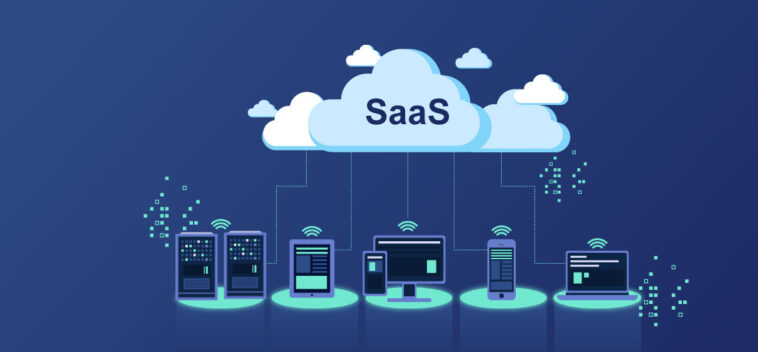
Software as a Service (SaaS) is a cloud computing model where software applications are hosted by a service provider and delivered to users over the internet. Users do not need to install, manage, or update the software locally. Instead, they access it through a web browser or mobile application.
Key characteristics of SaaS include:
Subscription-based pricing
No local installation required
Automatic updates and maintenance
Accessibility from any device with internet access
SaaS is widely used by individuals, startups, and large enterprises because it reduces costs and simplifies software management.
Simple SaaS Examples
Why Security Matters in SaaS Environments
While SaaS applications offer convenience and efficiency, they also introduce security challenges, such as:
Data breaches
Unauthorized access
Phishing attacks
Malware infections
Insider threats
Because SaaS applications store sensitive data in the cloud, organizations must ensure that this data is protected at all times. This growing need for protection has led to the rise of Security as a Service.
Why Simple SaaS Applications Are So Popular
Simple SaaS examples are popular because they solve common problems with minimal technical effort. Their popularity is driven by several factors:
Ease of Use
Most SaaS tools are designed for non-technical users and require little to no training.
Accessibility
Users can access SaaS applications from anywhere using a laptop, tablet, or smartphone.
Cost Efficiency
There is no need to buy expensive hardware or software licenses.
Automatic Updates
Users always have access to the latest version without manual upgrades.
Collaboration
Many SaaS tools support real-time collaboration and sharing.
Simple SaaS Examples Used in Everyday Life
Below are some of the most common and simple SaaS examples that millions of people use daily.
1. Web-Based Email Services
Email platforms are among the simplest and most widely used SaaS applications. Users can send, receive, and manage emails directly through a browser.
Why Email Is a SaaS Example
No installation required
Accessible from any device
Built-in spam filtering and security
Cloud storage for messages and attachments
Email SaaS platforms are used by individuals, businesses, and organizations of all sizes.
2. Online Document Editors
Online word processors and spreadsheet tools allow users to create and edit documents in real time.
Key Features
Cloud-based file storage
Real-time collaboration
Auto-save functionality
Easy sharing and permissions
These tools eliminate the need for traditional desktop office software and make teamwork much easier.
3. Cloud Storage Services
Cloud storage platforms are classic examples of simple SaaS applications. They allow users to store files online and access them from anywhere.
Benefits
Automatic backup
Easy file sharing
Version history
No physical storage devices required
Cloud storage SaaS solutions are commonly used for personal files, business documents, and media storage.
4. Video Conferencing Tools
Video meeting platforms have become essential, especially with the rise of remote work and online education.
Why Video Conferencing Is SaaS
Runs entirely in the cloud
No complex setup
Accessible via browser or app
Scales easily for small or large meetings
These tools provide voice, video, chat, and screen-sharing features without requiring advanced hardware.
Simple SaaS Examples
5. Task and To-Do List Applications
Simple task management tools help users organize daily activities, personal goals, and work assignments.
Common Features
Task creation and deadlines
Notifications and reminders
Simple dashboards
Sync across devices
These SaaS tools are popular with students, freelancers, and professionals looking to improve productivity.
6. Project Management Tools
Project management SaaS applications help teams plan, track, and manage work efficiently.
Why They Are Simple SaaS Examples
Web-based dashboards
Drag-and-drop interfaces
Team collaboration features
No server installation
They are widely used by startups, marketing teams, and software development teams.
7. Customer Relationship Management (CRM) Tools
CRM systems help businesses manage customer interactions, sales pipelines, and support requests.
Key SaaS Characteristics
Centralized customer data
Accessible from anywhere
Automatic updates
Subscription pricing
Even basic CRM tools demonstrate how SaaS simplifies complex business processes.
8. Online Accounting and Invoicing Software
Accounting SaaS platforms allow businesses to manage finances without installing accounting software locally.
Benefits
Cloud-based financial records
Automatic calculations
Invoice generation
Secure access
These tools are especially popular with small businesses and freelancers.
Simple SaaS Examples
9. Learning Management Systems (LMS)
Online learning platforms are SaaS applications used for education and training.
Features
Course creation and delivery
User progress tracking
Online assessments
Access from anywhere
LMS platforms are used by schools, universities, and corporate training departments.
10. Website Builders
Website builders are simple SaaS tools that allow users to create websites without coding.
Why Website Builders Are SaaS
Hosted in the cloud
No technical skills required
Templates and drag-and-drop editors
Built-in hosting and maintenance
They are popular with small businesses, bloggers, and entrepreneurs.
Simple SaaS Examples
Advantages of Using Simple SaaS Applications
Simple SaaS examples offer several advantages:
Low entry barrier
Minimal technical knowledge required
Fast deployment
Flexible pricing models
High availability and reliability
These benefits make SaaS the preferred software delivery model for many modern applications.
Challenges of SaaS Applications
Despite their simplicity, SaaS applications may present some challenges:
Dependence on internet connectivity
Limited customization in some tools
Data privacy concerns
Vendor lock-in
However, for most users, the advantages outweigh these limitations.
Simple SaaS Examples
How SaaS Is Different from Traditional Software
| Feature | SaaS | Traditional Software |
|---|---|---|
| Installation | Not required | Required |
| Updates | Automatic | Manual |
| Access | Online | Local device |
| Pricing | Subscription | One-time license |
| Maintenance | Provider-managed | User-managed |
The Future of SaaS Applications
The future of SaaS is focused on:
Artificial intelligence integration
Better user experience
Increased automation
Deeper collaboration features
Industry-specific SaaS solutions
Simple SaaS applications will continue to evolve while remaining easy to use and accessible.
Simple SaaS Examples
Conclusion
Simple SaaS examples such as email services, cloud storage, document editors, and video conferencing tools show how Software as a Service has become an essential part of modern digital life. These applications offer simplicity, accessibility, and efficiency without the complexity of traditional software.
As cloud computing continues to grow, SaaS will remain the most widely adopted service model, providing users with powerful tools that are easy to use, cost-effective, and always available.
Understanding simple SaaS examples helps individuals and businesses appreciate how cloud-based software improves productivity and transforms the way we work and communicate.