VDI Full Form in Computer: Meaning, Architecture, Benefits, and Real-World Applications
In modern IT environments, organizations no longer rely solely on traditional desktop computers installed and maintained individually. Instead, businesses, schools, and even governments are moving toward centralized digital workspaces. One of the most important technologies enabling this transformation is VDI.
VDI Full Form in Computer
VDI full form in computer is: Virtual Desktop Infrastructure.
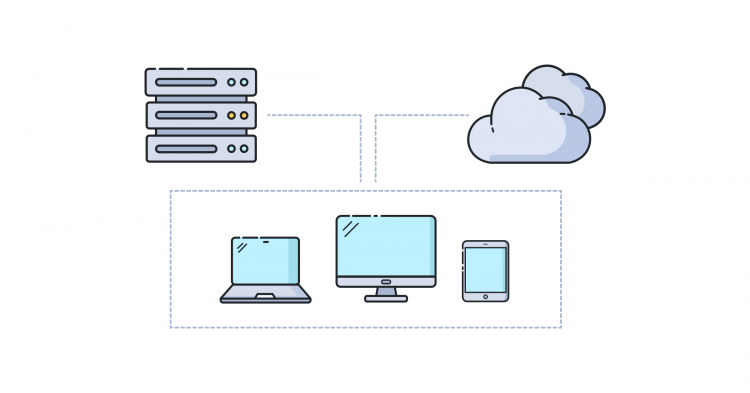
Virtual Desktop Infrastructure is a virtualization technology that hosts desktop operating systems on a centralized server rather than on a local personal computer. Users access their desktop remotely through the internet or a private network, but the operating system, applications, and data actually run inside a data center or cloud environment.
VDI is not just a remote access tool — it represents a complete shift in how computing resources are delivered, secured, managed, and scaled. To truly understand its importance, we need to explore its architecture, functionality, and its growing role in cloud computing.
VDI Full Form in Computer
Understanding the Concept of VDI
Traditionally, when you power on a computer, everything happens locally. The operating system (Windows, Linux, macOS), installed programs, storage files, and processing all exist inside that physical machine. If the device breaks, gets stolen, or infected with malware, your entire working environment is at risk.
VDI changes this model completely.
Instead of running locally, your desktop environment runs inside a virtual machine (VM) hosted on a powerful centralized server. When you log in, your screen simply displays a live stream of that virtual desktop.
In simple terms:
Your computer becomes a window, not the brain.
The actual processing happens remotely in a data center.
This is why a very weak laptop, tablet, or even a thin client device can run high-performance applications such as engineering software, video editing tools, or enterprise systems — because the heavy computing work is done by servers.
VDI Full Form in Computer
How VDI Works
To understand VDI properly, imagine a large office building where instead of giving each employee a full office, the company builds a central control room with hundreds of powerful computers. Employees simply connect to their assigned workspace from anywhere.
VDI operates using several core components:
1. Hypervisor
The hypervisor is the software layer responsible for creating and running virtual machines. It divides a physical server into multiple virtual desktops. Each user gets their own independent operating system instance.
Examples of hypervisors include:
VMware ESXi
Microsoft Hyper-V
Citrix Hypervisor
KVM (Kernel-based Virtual Machine)
2. Virtual Machines (VMs)
Each user desktop exists as a virtual machine. It behaves exactly like a physical computer, with its own:
Operating system
Applications
Settings
User files
However, all of these exist on the server instead of the local device.
3. Connection Broker
This is the brain of the VDI environment. It authenticates users and assigns them to their correct virtual desktop when they log in.
Without the connection broker, users would not be able to reach their desktops efficiently.
4. Remote Display Protocol
VDI transmits screen images to the user device. Instead of transferring actual programs, it sends compressed visual data. Mouse clicks and keyboard inputs are sent back to the server in real time.
Common protocols:
RDP (Remote Desktop Protocol)
PCoIP (PC over IP)
HDX (Citrix High Definition Experience)
VDI Full Form in Computer
Types of VDI
VDI environments are generally categorized into two major models.
Persistent VDI
In persistent VDI, each user receives a dedicated desktop that keeps all changes permanently. When the user logs in again, the desktop appears exactly as it was left.
This is similar to having a personal computer — but hosted remotely.
It is best suited for:
Developers
Designers
Engineers
Power users
Non-Persistent VDI
Here, users log into a temporary desktop. After logout, the system resets the machine to a clean state.
This model is widely used in:
Schools
Call centers
Hospitals
Public computer labs
It is easier to manage and more secure because malware or unwanted changes disappear automatically.
VDI Full Form in Computer
Role of VDI in Cloud Computing
VDI is one of the key technologies that helped create modern Digital Workspaces and Desktop as a Service (DaaS).
Cloud providers now host virtual desktops in their infrastructure. Instead of companies building their own data centers, they rent desktops on demand.
This means:
Organizations no longer manage hardware — they manage user access.
Cloud-hosted VDI allows employees to log in from anywhere:
Home
Coffee shop
Airport
Different countries
This became especially important during the global shift to remote work.
VDI Full Form in Computer
Advantages of Virtual Desktop Infrastructure
Centralized Management
IT administrators can update, patch, and secure hundreds of desktops from one location. Installing software once on the server automatically applies to all users.
Improved Security
Data never leaves the data center. If a laptop is stolen, the thief only has the device — not the files. All information remains on the server.
Hardware Cost Reduction
Companies can use low-cost thin clients instead of expensive computers because processing is server-side.
Remote Access and Flexibility
Users can access their desktop using:
PCs
Tablets
Smartphones
Thin clients
The experience remains identical.
Disaster Recovery
If a physical office is damaged or inaccessible, employees can still work from home instantly because desktops exist in the cloud.
VDI Full Form in Computer
Challenges and Limitations
While VDI is powerful, it is not perfect.
High Initial Setup Cost
On-premises VDI requires powerful servers, storage systems, and networking equipment.
Network Dependency
A stable and fast internet connection is critical. Slow connectivity causes lag, screen delay, and poor user experience.
Storage Performance
Many users accessing storage simultaneously can create input/output bottlenecks unless high-performance SSD storage is used.
Graphics-Intensive Workloads
Applications such as 3D modeling and gaming require GPU virtualization, which increases complexity and cost.
VDI Full Form in Computer
VDI vs Traditional Desktops
| Feature | Traditional PC | VDI |
|---|---|---|
| Data Location | Local device | Data center/server |
| Security | Device dependent | Centralized and controlled |
| Maintenance | Individual computers | Managed centrally |
| Hardware Requirement | High | Low (thin clients possible) |
| Remote Access | Limited | Built-in capability |
| Backup | Manual | Automated |
VDI vs DaaS
VDI and DaaS are closely related but not identical.
VDI: Organization builds and manages its own infrastructure.
DaaS (Desktop as a Service): Cloud provider hosts and manages the desktops.
Think of it as:
VDI = You own the virtual desktop environment
DaaS = You rent the virtual desktop environment
VDI Full Form in Computer
Real-World Use Cases
Education
Schools provide computer labs without needing powerful student computers. Students log in from home and access the same learning environment.
Healthcare
Doctors access patient systems securely from different hospital branches without transferring sensitive data.
Call Centers
Employees can work remotely while still using company applications securely.
Software Development
Developers quickly spin up standardized environments without configuring local machines.
Financial Institutions
Banks use VDI to maintain strict data security and regulatory compliance.
VDI Full Form in Computer
Security Features in VDI
VDI environments are often more secure than physical desktops due to built-in protection mechanisms:
Multi-factor authentication
Network isolation
Centralized antivirus scanning
Session monitoring
Automatic patch management
No local data storage
This makes VDI extremely valuable in industries requiring high compliance, such as banking and government.
VDI Full Form in Computer
Future of VDI
VDI is evolving rapidly with cloud and AI integration.
Upcoming trends include:
AI-driven performance optimization
GPU virtualization for 3D workloads
Edge computing desktops
Zero-trust security integration
Browser-based virtual desktops
As 5G and fiber internet expand globally, remote desktops will feel almost identical to local machines.
In fact, many experts predict that traditional personal computers may eventually become secondary devices, replaced by streamed operating systems.
VDI Full Form in Computer
Conclusion
VDI (Virtual Desktop Infrastructure) is far more than a remote desktop solution. It is a fundamental technology that transforms how computing resources are delivered and managed. By centralizing desktops into virtual machines hosted in data centers or cloud platforms, organizations gain improved security, flexibility, scalability, and operational efficiency.
Although challenges such as network dependency and infrastructure costs still exist, the advantages outweigh the limitations in most enterprise environments. With the rise of remote work, cybersecurity concerns, and cloud computing, VDI has become a critical component of modern IT architecture.
As businesses continue adopting digital workspaces, VDI will play an even greater role in enabling secure, location-independent computing — where the workplace is no longer a physical office, but a virtual environment accessible from anywhere in the world.