What Is a Virtual Desktop?
As organizations continue moving toward cloud-driven infrastructures, one question has become increasingly common among IT leaders, business owners, and technology professionals: what is a virtual desktop? Virtual desktop technology has emerged as a cornerstone of modern digital workplaces, offering centralized management, improved security, and flexible remote access. This article provides a comprehensive guide to understanding virtual desktops, their architecture, use cases, benefits, challenges, and their growing importance in cloud computing.
What Is a Virtual Desktop?
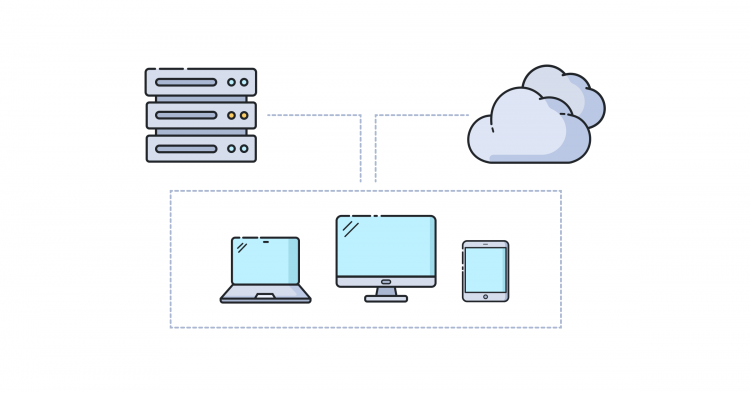
A virtual desktop is a computing environment where the user’s desktop interface—including the operating system, applications, and files—is hosted on a remote server rather than on a local physical device. Instead of relying on the hardware capabilities of a laptop or PC, users access their desktops via an internet connection using thin clients, mobile devices, tablets, or traditional computers.
By answering the core question—what is a virtual desktop?—we recognize it as a form of Virtual Desktop Infrastructure (VDI) or Desktop-as-a-Service (DaaS), depending on whether it is deployed on-premises or delivered through the cloud by a third-party provider.
What Is a Virtual Desktop
Key Characteristics of Virtual Desktops
Centralized Management: All desktops are stored, maintained, and updated from a central data center.
Remote Accessibility: Users can access their desktops from anywhere with an internet connection.
Scalability: IT teams can create, modify, or remove virtual desktops easily.
Security: Sensitive data is stored on a secure server rather than a user’s device.
This architecture makes virtual desktops ideal for distributed teams, enterprise environments, and organizations with high security requirements.
What Is a Virtual Desktop
How Virtual Desktops Work
To fully understand what is a virtual desktop, it is essential to explore its underlying architecture. A virtual desktop environment consists of the following components:
1 Virtual Machines (VMs)
Each virtual desktop runs as a virtual machine hosted on a centralized server. These VMs run an operating system—commonly Windows or Linux—and contain the user’s desktop configuration.
2 Hypervisor
The hypervisor is responsible for creating and managing VMs. It allocates CPU, RAM, storage, and network resources from the host server to each virtual desktop.
3 Connection Broker
This component connects users to their assigned virtual desktops. It authenticates login requests, ensures resource availability, and directs users to the correct VM.
4 Remote Display Protocols
Protocols such as RDP, PCoIP, HDX, or Blast Extreme deliver the desktop interface to the user’s device, ensuring low-latency, high-quality display performance.
5 Storage and Networking
All applications, user profiles, and data are stored in centralized enterprise storage systems, providing resilience and quick access.
What Is a Virtual Desktop
Types of Virtual Desktops
Virtual desktops generally fall into two major categories, each addressing different business requirements.
1 Persistent Virtual Desktops
Each user receives a dedicated VM that retains personal settings, installed applications, and saved data.
Ideal for: developers, designers, or employees needing personalized desktops.
2 Non-Persistent Virtual Desktops
Desktops reset to a clean state after every logout.
Ideal for: call centers, educational labs, shared workstations, or temporary employees.
Understanding these types helps organizations determine what is a virtual desktop in context with their operational needs.
What Is a Virtual Desktop
Why Virtual Desktops Matter
Virtual desktops create a modern digital workspace that enhances productivity, standardization, and security.
1 Enhanced Remote Work Flexibility
With remote work becoming a global norm, virtual desktops enable secure access to corporate resources from any location or device.
2 Centralized Security
Data resides on the server, not the endpoint device, reducing the risks of:
device theft
unauthorized data copying
malware attacks
This makes virtual desktops particularly valuable for industries with strict compliance standards such as finance, healthcare, and government.
3 Cost Efficiency
Organizations save money by reducing hardware upgrades, minimizing local software installations, and simplifying IT maintenance.
4 Consistent Work Environment
Employees experience the same desktop, applications, and performance regardless of the device they use.
5 Improved Scalability
IT teams can rapidly deploy new desktops or adjust resource allocations based on workforce changes or seasonal demand.
What Is a Virtual Desktop
Use Cases of Virtual Desktops
To better understand what is a virtual desktop in practical terms, consider the following use cases:
1 Remote Workforce and Hybrid Teams
Virtual desktops ensure uninterrupted productivity for distributed teams by providing consistent access to software and business tools.
2 Call Centers and Contact Centers
Non-persistent desktops are ideal for rotating staff who require quick access to standardized applications.
3 Education and Training Labs
Institutions can provision virtual desktops for online learning labs, eliminating the need for expensive computer rooms.
4 Healthcare Systems
Physicians and administrators access patient data through secure virtual desktops, ensuring compliance with data privacy laws.
5 Software Development and Testing
Developers utilize powerful VMs for coding, testing, and running resource-intensive applications without needing high-end local machines.
6 Government and Defense
Virtual desktops offer strong encryption, centralized oversight, and secure access control suitable for sensitive environments.
What Is a Virtual Desktop
Benefits of Virtual Desktops
The adoption of virtual desktops delivers several significant advantages:
1 Stronger Security Framework
Centralized data storage reduces endpoint vulnerabilities and supports advanced security protocols.
2 Reduced IT Operational Load
Patching, updating, and application deployment are conducted centrally, reducing administrative complexity.
3 Business Continuity
In case of device failure or disaster, users can access their desktops from another device within seconds.
4 Device and OS Independence
Virtual desktops work across Windows, macOS, Android, iOS, Linux, and even thin clients.
5 Consistent User Experience
Regardless of hardware performance, users experience the same interface and responsiveness.
What Is a Virtual Desktop
Challenges of Virtual Desktop Environments
Despite numerous advantages, virtual desktops also present challenges that organizations must address:
1 Initial Setup Cost
Deploying VDI requires investment in servers, hypervisors, storage systems, and networking infrastructure.
2 Bandwidth Limitations
Virtual desktops rely heavily on stable network connectivity; poor bandwidth can affect performance.
3 Complexity of VDI Management
Advanced skills are needed to maintain infrastructure, optimize load balancing, and ensure seamless performance.
4 Licensing Costs
Some desktop operating systems and applications require specialized licensing for virtual environments.
What Is a Virtual Desktop
Virtual Desktops vs. Traditional Desktops
Understanding what is a virtual desktop often requires comparing it to traditional computing.
| Feature | Virtual Desktop | Traditional Desktop |
|---|---|---|
| Data Storage | Centralized | Local device |
| Hardware Cost | Low device dependency | High-end PC required |
| Security | Strong, centralized | Vulnerable to theft and malware |
| Maintenance | Centralized | Individual device updates |
| Scalability | High | Limited |
| Remote Access | Excellent | Limited |
This comparison highlights why many organizations are transitioning to virtual environments.
What Is a Virtual Desktop
Virtual Desktop Solutions in the Market
Several industry-leading platforms provide virtual desktop solutions:
1 VMware Horizon
A powerful enterprise-grade VDI platform offering robust security and performance optimization.
2 Citrix Virtual Apps and Desktops
Known for exceptional remote display protocols and centralized management capabilities.
3 Microsoft Azure Virtual Desktop (AVD)
A cloud-hosted desktop solution offering deep integration with Microsoft 365 and Azure services.
4 Amazon WorkSpaces
A fully managed DaaS solution suitable for global workforce deployment.
The Future of Virtual Desktops
The future of virtual desktops is shaped by global cloud adoption, expansion of remote work, and advancements in AI and automation.
Future Trends Include:
AI-driven desktop performance optimization
Zero-trust security models
Greater integration with SaaS and cloud-native applications
Faster remote display protocols
Growth of Desktop-as-a-Service (DaaS) adoption
As organizations continue to modernize their IT infrastructure, virtual desktops will play an increasingly central role.
What Is a Virtual Desktop
Conclusion
To summarize, what is a virtual desktop? It is a cloud-hosted or data-center-managed environment that provides remote, secure, and scalable access to desktop computing resources. Virtual desktops offer significant advantages in terms of flexibility, security, cost savings, and centralized management, making them an essential technology for modern digital workplaces.
Whether used for remote employees, secure industries, IT optimization, or large-scale enterprise systems, virtual desktops enable organizations to embrace a more efficient and resilient way of working. As cloud computing continues to evolve, virtual desktops will remain a vital component of future-ready IT ecosystems.