What Is a Virtual Desktop Infrastructure
As organizations increasingly adopt remote work, cloud computing, and digital transformation strategies, traditional desktop computing models are no longer sufficient. Managing hundreds or thousands of physical desktops, ensuring data security, and providing consistent access across locations has become complex and costly. To solve these challenges, many enterprises are turning to a centralized solution known as Virtual Desktop Infrastructure (VDI).
But what is a virtual desktop infrastructure, how does it work, and why has it become a core technology in modern IT environments?
This in-depth professional guide explains VDI from the ground up, including its architecture, components, benefits, challenges, use cases, and how it compares to other desktop delivery models.
What Is a Virtual Desktop Infrastructure
What Is a Virtual Desktop Infrastructure?
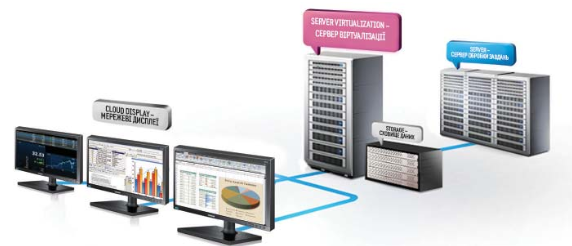
Virtual Desktop Infrastructure (VDI) is a technology that allows desktop operating systems to run on centralized servers in a data center instead of on individual physical computers. Users access these virtual desktops remotely over a network using endpoint devices such as laptops, tablets, thin clients, or even smartphones.
In simple terms:
The desktop environment runs on a server.
The user’s device acts as a screen and input interface.
All processing and data storage happen centrally.
VDI enables organizations to deliver secure, consistent, and scalable desktop experiences to users regardless of their physical location.
What Is a Virtual Desktop Infrastructure
How Virtual Desktop Infrastructure Works
To fully understand what is a virtual desktop infrastructure, it helps to look at the workflow behind the technology.
Desktop operating systems (usually Windows or Linux) are installed on virtual machines hosted on centralized servers.
These virtual machines run inside a virtualization platform.
Users connect to their virtual desktops using a remote display protocol.
Keyboard, mouse, and screen data are transmitted securely over the network.
User data and applications remain stored in the data center.
The user experiences a full desktop environment that behaves just like a traditional PC—but without the limitations of local hardware.
What Is a Virtual Desktop Infrastructure
Core Components of VDI
A Virtual Desktop Infrastructure environment consists of several key components working together.
1. Virtualization Platform
This is the foundation of VDI. It enables multiple virtual desktops to run on a single physical server using hypervisor technology.
2. Connection Broker
The connection broker authenticates users and assigns them to the appropriate virtual desktop. It also manages load balancing and session persistence.
3. Virtual Desktop Images
These are standardized desktop templates containing the operating system, applications, and configurations.
4. Remote Display Protocol
Protocols such as RDP, PCoIP, or HDX transmit the desktop display to the user device with minimal latency.
5. Storage Infrastructure
Centralized storage holds operating systems, user profiles, and data. Performance and reliability are critical.
6. Endpoint Devices
These are the devices users connect from, such as PCs, thin clients, or mobile devices.
What Is a Virtual Desktop Infrastructure
Types of Virtual Desktop Infrastructure
There are two primary VDI models.
Persistent VDI
In persistent VDI:
Each user gets a dedicated virtual desktop.
Settings, files, and applications remain saved between sessions.
The experience feels like a personal computer.
This model is ideal for developers, designers, and power users who need customized environments.
Non-Persistent VDI
In non-persistent VDI:
Users are assigned a temporary desktop from a shared pool.
The desktop resets after logout.
Changes are not saved unless redirected to external storage.
This model is commonly used in call centers, training labs, and educational institutions.
What Is a Virtual Desktop Infrastructure
On-Premises VDI vs Cloud-Based VDI
VDI can be deployed in different environments depending on organizational needs.
On-Premises VDI
The infrastructure is hosted inside the organization’s own data center. This offers full control but requires high upfront investment and skilled IT staff.
Cloud-Based VDI
Virtual desktops are hosted in a public cloud environment. This reduces capital expenses and improves scalability.
Many organizations adopt hybrid models that combine both approaches.
What Is a Virtual Desktop Infrastructure
Leading Virtual Desktop Infrastructure Platforms
Several technology companies dominate the VDI market with enterprise-grade solutions.
VMware Horizon
VMware Horizon is one of the most widely used VDI platforms. It offers advanced desktop virtualization, strong security, and integration with enterprise infrastructure.
Citrix Virtual Apps and Desktops
Citrix is known for high-performance remote desktop delivery and optimized user experience, especially over low-bandwidth connections.
Microsoft Azure Virtual Desktop
Azure Virtual Desktop is Microsoft’s cloud-based VDI solution that integrates seamlessly with Windows and Microsoft 365.
These platforms are widely used by enterprises, governments, and educational institutions worldwide.
What Is a Virtual Desktop Infrastructure
Benefits of Virtual Desktop Infrastructure
Understanding what is a virtual desktop infrastructure also means understanding why organizations adopt it.
1. Enhanced Security
Data stays in the data center, not on endpoint devices. This reduces the risk of data loss from stolen or compromised laptops.
2. Centralized Management
IT teams manage desktops, applications, and updates from a single location, reducing operational complexity.
3. Remote Work Enablement
Users can access their desktops securely from anywhere with an internet connection.
4. Hardware Cost Reduction
Organizations can use thin clients or older devices since processing happens on servers.
5. Faster Deployment
New desktops can be provisioned in minutes instead of days or weeks.
6. Business Continuity
If a user device fails, work can continue immediately from another device.
What Is a Virtual Desktop Infrastructure
Use Cases for Virtual Desktop Infrastructure
VDI is used across many industries and scenarios.
Enterprise Workforces
Large organizations use VDI to standardize desktops and improve security.
Healthcare
Hospitals use VDI to give doctors and nurses secure access to patient systems from multiple locations.
Education
Schools and universities use VDI for computer labs and remote learning.
Call Centers
Non-persistent VDI enables fast onboarding and secure access for large numbers of agents.
Software Development
Developers use persistent VDI environments with powerful centralized hardware.
VDI vs Traditional Desktops
| Feature | Traditional Desktop | VDI |
|---|---|---|
| Data location | Local device | Centralized |
| Security | Device-dependent | Centralized |
| Maintenance | Per device | Centralized |
| Remote access | Limited | Built-in |
| Scalability | Low | High |
This comparison highlights why VDI is increasingly replacing traditional desktop models.
VDI vs Desktop as a Service (DaaS)
Although related, VDI and DaaS are not the same.
VDI is typically managed by the organization.
DaaS is managed by a third-party cloud provider.
VDI offers more control, while DaaS offers simplicity and lower management overhead.
Challenges of Virtual Desktop Infrastructure
Despite its advantages, VDI also presents challenges.
High Initial Cost
Servers, storage, and licenses can be expensive upfront.
Complexity
Designing and maintaining VDI requires specialized expertise.
Network Dependency
Performance depends heavily on network reliability and latency.
User Experience
Poor configuration can result in lag or degraded performance.
Proper planning and infrastructure design are critical for successful VDI deployment.
What Is a Virtual Desktop Infrastructure
Performance Considerations
To deliver a good user experience, VDI environments must consider:
CPU and memory allocation
GPU acceleration for graphics workloads
Fast storage (SSD or NVMe)
Network bandwidth and latency
Profile management
Performance tuning is a continuous process.
What Is a Virtual Desktop Infrastructure
Security in VDI Environments
VDI enables advanced security controls such as:
Multi-factor authentication
Role-based access control
Session monitoring
Data loss prevention
Endpoint isolation
Because desktops are centralized, applying security policies becomes easier and more consistent.
What Is a Virtual Desktop Infrastructure
The Future of Virtual Desktop Infrastructure
VDI continues to evolve alongside cloud computing and modern workplace trends.
Future developments include:
AI-driven resource optimization
Deeper cloud integration
Improved graphics performance
Zero Trust security models
Integration with hybrid and multi-cloud environments
As remote and hybrid work models become permanent, VDI is expected to remain a core enterprise technology.
What Is a Virtual Desktop Infrastructure
Conclusion
So, what is a virtual desktop infrastructure?
Virtual Desktop Infrastructure is a centralized desktop delivery model that allows organizations to run desktop environments on servers and deliver them securely to users anywhere in the world. By separating the desktop from physical devices, VDI improves security, simplifies management, and enables flexible work environments.
While VDI requires careful planning and investment, its benefits—centralized control, enhanced security, and scalability—make it an essential solution for modern enterprises. As businesses continue to prioritize remote work, data protection, and operational efficiency, Virtual Desktop Infrastructure will remain a critical pillar of enterprise IT strategy.