Desktop as a Service (DaaS): The Complete Professional Guide
The workplace has changed dramatically over the last decade. Employees no longer sit in a single office using one fixed computer connected to a local company server. Today, organizations operate across cities, countries, and even continents. Remote work, hybrid teams, freelancers, outsourcing, and global collaboration have all become normal.
This transformation created a major challenge for IT departments:
How can companies securely deliver a full desktop environment to employees anywhere, on any device, without shipping expensive computers or exposing sensitive data?
The solution is desktop as a service.
In this article, you will learn what desktop as a service is, how it works, why organizations adopt it, and how it is reshaping modern enterprise IT infrastructure.
What Is Desktop as a Service?
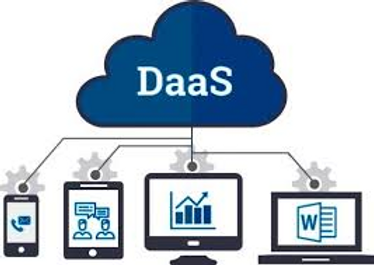
Desktop as a service (DaaS) is a cloud computing solution that delivers a complete virtual desktop environment over the internet. Instead of running an operating system and applications on a physical computer, the entire desktop runs inside a cloud data center.
Users access their desktop remotely through a web browser or a small client application.
In simple terms:
Your computer screen is just a window.
The real computer exists in the cloud.
The user sees Windows (or Linux), applications, files, and settings exactly like a normal PC — but everything is hosted remotely on powerful servers maintained by a cloud provider.
How Desktop as a Service Works
To understand desktop as a service, imagine a traditional office setup.
Normally:
Each employee has a physical PC
Software is installed locally
Files are stored on the machine
IT staff must maintain every device
With desktop as a service:
The desktop operating system runs on a virtual machine in the provider’s data center.
Applications are installed centrally.
User data is stored securely in the cloud.
The employee connects remotely via internet.
The user’s laptop, tablet, or even phone only displays the interface and sends keyboard and mouse input.
This technology relies on virtualization and remote display protocols that stream the desktop screen in real time.
Key Components of Desktop as a Service
Desktop as a service environments consist of several important elements:
Virtual Machines
Each user receives a virtual computer (VM) with its own operating system.
Remote Display Protocol
Protocols like RDP or PCoIP transmit the desktop interface efficiently across the internet.
Cloud Storage
All files and user profiles are stored centrally.
Identity Management
Users authenticate using secure login credentials or multi-factor authentication.
Management Console
Administrators control users, permissions, and software from a single dashboard.
DaaS vs Traditional Desktops
| Feature | Traditional Desktop | Desktop as a Service |
|---|---|---|
| Hardware | Physical PC required | Any device works |
| Software Installation | Local | Centralized |
| Maintenance | Per computer | Managed centrally |
| Data Location | Local disk | Cloud data center |
| Remote Access | Difficult | Built-in |
| Security | Device dependent | Centralized security |
This comparison shows why organizations increasingly adopt desktop as a service.
Why Businesses Use Desktop as a Service
There are several strategic reasons companies are moving toward desktop as a service solutions.
1. Remote Work Support
Employees can access their work environment from home, travel locations, or different countries without needing office computers.
2. Device Independence
Workers can use:
Personal laptops
Tablets
Thin clients
Even public computers
Their work desktop remains the same everywhere.
3. Simplified IT Management
Instead of maintaining hundreds of computers, IT teams manage one centralized system.
4. Faster Employee Onboarding
A new employee can receive a complete working environment within minutes by creating a user account.
5. Business Continuity
If an employee’s laptop breaks, no data is lost. They log in from another device and continue working instantly.
Security Benefits of Desktop as a Service
Security is one of the strongest advantages of desktop as a service.
Data Never Leaves the Cloud
Files are stored in the data center, not on employee devices. Even if a laptop is stolen, the data remains safe.
Centralized Updates
Security patches and antivirus updates are applied once to the system instead of every computer.
Access Control
Administrators can:
Disable accounts
Restrict USB access
Prevent file downloads
Monitor activity
Multi-Factor Authentication
Users can be required to confirm login using mobile verification codes.
Because of these features, desktop as a service is widely used in finance, healthcare, and government sectors.
Major Desktop as a Service Providers
Several technology companies offer enterprise-grade desktop as a service platforms.
Microsoft Azure Virtual Desktop
Provides Windows desktops hosted in Microsoft Azure cloud and integrates with Microsoft 365.
Amazon WorkSpaces
AWS solution delivering scalable virtual desktops worldwide.
Google Cloud VMware Horizon
Combines VMware virtualization with Google cloud infrastructure.
Citrix DaaS
A long-standing leader in virtual desktop technology, popular in large enterprises.
Each provider offers scalability, security, and centralized management.
Cost Advantages
One of the biggest motivations for adopting desktop as a service is cost optimization.
Reduced Hardware Costs
Companies no longer need expensive workstations.
Lower Maintenance Expenses
IT staff spend less time repairing devices.
Predictable Monthly Billing
DaaS typically uses subscription pricing.
Longer Device Lifespan
Even old computers can access powerful cloud desktops.
Organizations convert IT spending from large capital investments into operational monthly costs.
Use Cases of Desktop as a Service
Desktop as a service is useful in many real-world scenarios.
Call Centers
Agents can log in from home securely.
Education
Students access school software without installing programs.
Healthcare
Doctors access patient systems securely across hospitals.
Software Development
Developers use standardized environments.
Temporary Employees
Contractors receive controlled system access without permanent equipment.
DaaS vs VDI (Virtual Desktop Infrastructure)
Many people confuse desktop as a service with VDI.
| Feature | VDI | DaaS |
|---|---|---|
| Infrastructure | Owned by company | Hosted by provider |
| Maintenance | Internal IT team | Provider managed |
| Cost | High upfront | Subscription |
| Complexity | Complex deployment | Simple deployment |
DaaS is essentially cloud-hosted VDI managed by a third-party provider.
Challenges of Desktop as a Service
Despite its benefits, desktop as a service has some limitations.
Internet Dependency
Performance relies on stable internet connectivity.
Latency
Slow connections may cause screen delay.
Graphics Performance
High-end 3D design may require specialized configurations.
Ongoing Subscription Costs
Monthly fees accumulate over time.
However, improvements in broadband and 5G connectivity are reducing these concerns.
Future of Desktop as a Service
Desktop as a service is becoming a core part of digital transformation strategies.
Future trends include:
AI-Powered Workspaces
Systems automatically allocate resources based on user workload.
Secure Bring Your Own Device (BYOD)
Employees use personal devices safely.
Cloud-Native Offices
Companies operating entirely without physical office computers.
Integration with Virtual Reality
Immersive virtual work environments.
As remote work continues expanding globally, DaaS adoption is expected to grow rapidly.
Conclusion
Desktop as a service represents a major evolution in enterprise computing. Instead of tying work environments to physical machines, organizations now deliver full desktops securely through the cloud.
By centralizing management, improving security, enabling remote work, and reducing hardware dependency, desktop as a service provides both operational flexibility and cost efficiency. Employees can work from anywhere, IT departments can manage systems more easily, and businesses can scale quickly without infrastructure limitations.
In the modern digital workplace, the computer is no longer a device sitting on a desk — it is a service accessible from anywhere. Desktop as a service is not just a technology trend; it is becoming the foundation of how organizations will operate in the future.