SaaS PaaS IaaS examples
As cloud adoption accelerates across organizations of all sizes, understanding the differences between the three main cloud service models—IaaS, PaaS, and SaaS—has become essential for business leaders, developers, IT teams, and digital transformation experts. Choosing the right cloud model influences cost efficiency, scalability, security, application performance, and long-term operational agility.
This comprehensive guide explains each cloud model in depth, explores its advantages and challenges, and provides updated real-world examples used across various industries.
SaaS PaaS IaaS examples
IaaS PaaS SaaS : Cloud Services Models
For all those interested in moving their business on the cloud, there are three models for cloud services that must be known and understood to determine what cloud service model will benefit him in his business, and we will mention here examples of these three cloud models.
- IaaS: Infrastructure as a Service, this model provides the infrastructure with all its resources such as processor, memory, hard disk, networks, and other computing resources, and this model allows you to define the properties of these resources according to your needs. For more details about Infrastructure as a Service, you can read this article: IaaS : Infrastructure as a service
- PaaS: the platform as a service, this model provides the basic system needed to run your programs and applications on it, in addition to the infrastructure that you specify according to the features you need in your business, for more details about the platform as a service, you can read this article: PaaS in cloud computing
- SaaS: Software as a service, this model provides the programs and applications that you need to develop any program or application in your business, and allows you to benefit from infrastructure with specifications compatible with your needs while providing an operating environment that allows this software to work efficiently on it, in addition to the necessary infrastructure according to business needs, for more details You can read this article: SaaS in Cloud Computing
SaaS PaaS IaaS examples
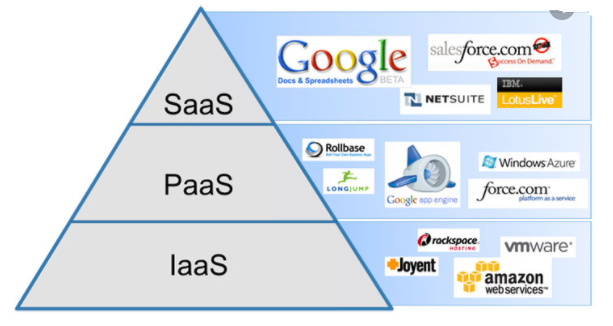
Cloud service providers offer different models of cloud services, some provide one type of them and others offer a mixture of these services.
- IaaS: Examples of infrastructure as a service are AWS EC2, Google Compute Engine (GCE), Digital Ocean, Rackspace.
- PaaS: Examples of the platform as a service are AWS Elastic Beanstalk, Windows Azure (mostly used as PaaS), Heroku, Apache Stratos, Magento Commerce Cloud, OpenShift,.
- SaaS: Examples of software as a service are Google Apps, Salesforce, BigCommerce, Dropbox, DocuSign, Slack, MailChimp, ZenDesk, Hubspot.
SaaS PaaS IaaS examples
What Are Cloud Service Models?
Cloud service models represent different levels of abstraction provided by cloud vendors to help businesses deploy and run applications without managing physical hardware. Each model—Infrastructure as a Service (IaaS), Platform as a Service (PaaS), and Software as a Service (SaaS)—delivers a unique set of features designed to support workloads at different layers of the computing stack.
Understanding these models helps organizations determine:
How much control they want over their systems
How much responsibility they want to manage internally
Which level of service aligns with their business goals and IT strategy
SaaS PaaS IaaS examples
1. IaaS: Infrastructure as a Service
Definition
Infrastructure as a Service (IaaS) provides virtualized computing resources over the internet. Instead of purchasing servers, storage, and networking equipment, organizations can rent these resources on a pay-as-you-go basis.
This model is ideal for businesses that want maximum control over their infrastructure but without the cost and maintenance of physical hardware.
Key Features of IaaS
Virtual machines and compute instances
Virtual networks, load balancers, and firewalls
Object storage and block storage
Customizable resources (CPU, RAM, GPU, OS)
High scalability and elasticity
Advantages
Full control over applications and operating systems
No need to maintain physical data centers
Easy scalability based on business demands
Cost-efficient for both startups and enterprises
Best for custom applications and complex workloads
Common Use Cases
Hosting websites and web applications
Running custom enterprise systems
Machine learning and big-data workloads
Backup, archiving, and disaster recovery
High-performance computing (HPC)
Examples of IaaS Providers
AWS EC2
Google Compute Engine (GCE)
Microsoft Azure Virtual Machines
IBM Cloud Virtual Servers
Oracle Cloud Infrastructure (OCI Compute)
DigitalOcean Droplets
Rackspace Technology
Alibaba Cloud Elastic Compute Service (ECS)
SaaS PaaS IaaS examples
2. PaaS: Platform as a Service
Definition
Platform as a Service (PaaS) provides a complete environment for application development, deployment, and management—without the complexity of handling servers, middleware, operating systems, or runtime environments.
PaaS is ideal for developers who want to focus on writing code while the platform handles the infrastructure, scalability, and runtime.
SaaS PaaS IaaS examples
Key Features of PaaS
Preconfigured development environments
Application hosting frameworks
Databases and middleware
Serverless computing features
Built-in scalability and automated updates
CI/CD tools for continuous integration and deployment
Advantages
Faster development cycles
No need to manage infrastructure
Lower operational overhead
Supports modern DevOps and cloud-native development
Provides built-in tools for automation and security
SaaS PaaS IaaS examples
Common Use Cases
Building and deploying web or mobile applications
Microservices and container-based architecture
API development and integration
Data processing and analytics
Enterprise application modernization
Examples of PaaS Providers
AWS Elastic Beanstalk
Google App Engine
Microsoft Azure App Service
Heroku
Red Hat OpenShift
Apache Stratos
SAP Cloud Platform
Magento Commerce Cloud
Oracle Cloud PaaS
SaaS PaaS IaaS examples
3. SaaS: Software as a Service
Definition
Software as a Service (SaaS) delivers software applications directly to end-users through a web browser—no installation or maintenance required. These applications run in the cloud and are managed entirely by the provider.
SaaS is ideal for businesses that want reliable, ready-to-use software without dealing with infrastructure, updates, or security patches.
Key Features of SaaS
Accessible from any device with internet
Automatic updates and security patches
Subscription-based pricing
Multi-tenant cloud environments
Scalable and flexible licensing
SaaS PaaS IaaS examples
Advantages
Fast implementation with no installation
Low upfront cost
Easy onboarding for teams
High reliability and uptime
Ideal for distributed and remote work models
Common Use Cases
Office productivity tools
Customer relationship management (CRM)
Email and communication platforms
Collaboration and cloud storage
Finance and accounting systems
Examples of SaaS Providers
Google Workspace (Gmail, Docs, Drive)
Microsoft 365 (Word, Excel, Teams)
Salesforce CRM
Slack
Dropbox
MailChimp
HubSpot
Zendesk
Shopify
DocuSign
Trello / Atlassian Cloud
SaaS PaaS IaaS examples
SaaS vs PaaS vs IaaS: What’s the Difference?
| Feature | IaaS | PaaS | SaaS |
|---|---|---|---|
| Infrastructure | ✔️ | ✔️ (managed by provider) | ❌ |
| Operating System | ✔️ | ❌ (provider manages) | ❌ |
| Application Code | ✔️ | ✔️ | ❌ |
| Ready-to-Use Software | ❌ | ❌ | ✔️ |
| Best For | IT teams, sysadmins | Developers, DevOps | End-users & businesses |
Which Cloud Model Should You Choose?
Choose IaaS if you need:
Full control over servers
Custom-built applications
Scalable computing resources
Choose PaaS if you need:
A managed development environment
Faster application deployment
Automated scalability
Choose SaaS if you need:
Ready-to-use applications
Low cost, fast setup
No infrastructure management
Many organizations use all three models together depending on workload requirements.
SaaS PaaS IaaS examples
Conclusion
Understanding IaaS, PaaS, and SaaS is essential for designing an effective cloud strategy that aligns with your business goals. Each cloud service model offers unique capabilities—from full infrastructure control to development platforms to complete ready-to-use software solutions.
By evaluating your technical needs, workload type, team expertise, and long-term growth plans, you can choose the right mix of cloud models to optimize performance, reduce costs, and accelerate digital transformation.
SaaS PaaS IaaS examples