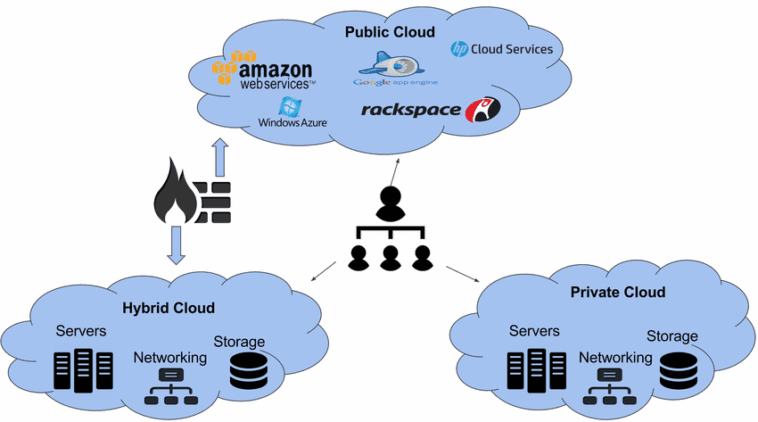
Cloud Deployment Models Diagram: Understanding Cloud Architecture
Cloud computing has become a cornerstone of modern IT infrastructure, offering scalability, flexibility, and cost efficiency. A critical aspect of cloud architecture is understanding cloud deployment models. These models determine how cloud resources are provisioned, accessed, and managed.
Visualizing these models with a cloud deployment models diagram provides clarity for organizations, IT professionals, and decision-makers. This article explains the main cloud deployment models, provides examples, and discusses the advantages and challenges of each model.
What Are Cloud Deployment Models Diagram?
A cloud deployment model defines the type of cloud environment, ownership, access, and management of cloud resources. It answers the question: “How and where are cloud services deployed?”
The main deployment models include:
Public Cloud
Private Cloud
Hybrid Cloud
Community Cloud
Each model has unique characteristics, benefits, and limitations.
1. Public Cloud Deployment Model
Definition:
A public cloud is hosted by a third-party provider and resources are shared among multiple organizations. Users access services over the internet.
Examples:
Amazon Web Services (AWS)
Microsoft Azure
Google Cloud Platform (GCP)
Cloud Deployment Models Diagram Representation:
Users connect via the internet to cloud provider data centers.
Multiple tenants share physical resources but maintain isolated environments.
Advantages:
Cost-effective: No infrastructure investment required.
Scalable: Resources can be increased or decreased dynamically.
Maintenance-free: The provider handles hardware and software management.
Challenges:
Limited control over security and compliance.
Data residency may be an issue for some industries.
Use Case:
Startups hosting web applications or SaaS platforms benefit from public cloud scalability and low entry cost.
2. Private Cloud Deployment Model
Definition:
A private cloud is dedicated to a single organization. It can be hosted on-premises or by a third-party provider.
Examples:
VMware vSphere private cloud
Microsoft Azure Stack
OpenStack private deployments
Cloud Deployment Models Diagram Representation:
The organization owns or leases dedicated servers.
Users access resources securely through a private network or VPN.
Advantages:
Enhanced security and privacy.
Greater control over data and infrastructure.
Compliance-friendly for regulated industries.
Challenges:
Higher costs due to dedicated infrastructure.
Requires in-house expertise or managed services.
Use Case:
Financial institutions or healthcare organizations storing sensitive data and complying with HIPAA, PCI-DSS, or GDPR.
3. Hybrid Cloud Deployment Model
Definition:
A hybrid cloud combines public and private clouds, allowing workloads to move between environments for flexibility and optimization.
Examples:
Azure hybrid solutions with on-premises servers
AWS Outposts connecting private data centers to AWS cloud
Cloud Deployment Models Diagram Representation:
Private cloud and public cloud environments are linked.
Data and applications can flow between both clouds depending on workload requirements.
Advantages:
Balances cost and security.
Supports workload optimization.
Enables disaster recovery and business continuity.
Challenges:
Complex integration and management.
Requires careful planning for data movement and security.
Use Case:
Medium to large enterprises using private clouds for sensitive data and public clouds for customer-facing applications or seasonal workloads.
4. Community Cloud Deployment Model
Definition:
A community cloud is shared among organizations with similar requirements, such as security, compliance, or policy.
Examples:
Government agencies sharing cloud infrastructure
Healthcare organizations creating a shared compliance cloud
Cloud Deployment Models Diagram Representation:
Multiple organizations access a cloud environment managed by a third party or consortium.
Infrastructure is shared but access is restricted to participating entities.
Advantages:
Cost-sharing among organizations.
Customized to meet specific industry requirements.
Enhanced security compared to public clouds.
Challenges:
Limited scalability compared to public clouds.
Governance and management may require consensus among participants.
Use Case:
A coalition of hospitals sharing a secure cloud environment for patient records while complying with healthcare regulations.
Understanding Cloud Deployment Models Diagram
A cloud deployment models diagram visually represents the relationships between users, cloud infrastructure, and deployment types.
Key Features of a Cloud Deployment Diagram:
Public Cloud: Users connected via the internet to a provider’s multi-tenant environment.
Private Cloud: Dedicated infrastructure accessed through a secure internal network.
Hybrid Cloud: Links between private and public clouds with controlled data flow.
Community Cloud: Shared resources among organizations with similar needs.
Benefits of Using a Diagram:
Simplifies understanding for non-technical stakeholders.
Assists IT planning and architecture design.
Enhances communication of security and compliance requirements.
Benefits of Different Cloud Deployment Models
| Deployment Model | Primary Benefit | Typical Users |
|---|---|---|
| Public Cloud | Low cost, scalable | Startups, SaaS applications |
| Private Cloud | Security, control | Banks, healthcare, government |
| Hybrid Cloud | Flexibility, workload optimization | Medium & large enterprises |
| Community Cloud | Shared cost, compliance | Industry consortia, hospitals, government agencies |
Factors to Consider When Choosing a Cloud Deployment Models Diagram
Business Requirements: Security, scalability, and workload type.
Budget: Private and hybrid clouds are more expensive than public clouds.
Compliance Needs: Regulatory requirements may dictate private or community clouds.
Technical Expertise: Private clouds require more in-house management.
Integration Needs: Hybrid cloud complexity requires careful planning.
Future Trends in Cloud Deployment Models
Edge Computing Integration: Deploying micro clouds closer to end-users to reduce latency.
Multi-Cloud Strategy: Enterprises using multiple cloud providers for resilience and flexibility.
Serverless and Function-as-a-Service (FaaS): Enhances hybrid and public cloud models.
AI and Automation in Cloud Management: Optimizing resources and security dynamically.
These trends will shape the evolution of cloud deployment, making it more flexible, secure, and efficient.
Conclusion
Understanding cloud deployment models is essential for businesses planning their IT strategy. A cloud deployment models diagram provides a clear visual representation of public, private, hybrid, and community cloud options.
Public clouds are ideal for cost-effective, scalable solutions.
Private clouds offer security and compliance for sensitive workloads.
Hybrid clouds balance flexibility, cost, and control.
Community clouds enable collaborative, compliance-driven environments.
Choosing the right deployment model ensures optimal performance, cost-efficiency, and security, helping organizations leverage cloud computing effectively.