IaaS vs PaaS vs SaaS vs DaaS: Understanding the Key Cloud Service Models
In today’s digital-first world, cloud computing has become an essential backbone for businesses, providing scalable, flexible, and cost-effective solutions for IT infrastructure and software deployment. Organizations can now choose from multiple cloud service models, each tailored to specific needs and levels of control. Understanding the differences between these models is critical for making informed technology decisions. This article provides a comprehensive comparison of IaaS vs PaaS vs SaaS vs DaaS, highlighting their features, benefits, use cases, and challenges.
IaaS vs PaaS vs SaaS vs DaaS
Introduction to Cloud Service Models
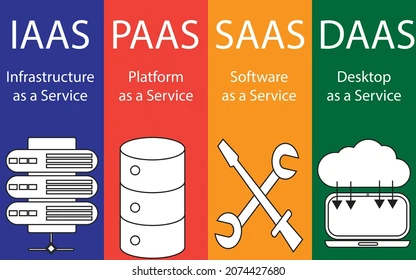
Cloud computing enables businesses to access computing resources over the internet, eliminating the need for on-premises hardware and software management. These services are typically categorized into four main models: Infrastructure as a Service (IaaS), Platform as a Service (PaaS), Software as a Service (SaaS), and Desktop as a Service (DaaS). Each model offers different levels of control, flexibility, and management responsibility.
Choosing the right cloud model depends on factors such as budget, technical expertise, business requirements, and security considerations. By comparing IaaS vs PaaS vs SaaS vs DaaS, organizations can align their cloud strategy with their operational goals and maximize the benefits of cloud adoption.
IaaS vs PaaS vs SaaS vs DaaS
1. Infrastructure as a Service (IaaS)
IaaS provides virtualized computing resources over the internet, including servers, storage, networking, and operating systems. In this model, the cloud provider manages the physical infrastructure, while the customer is responsible for managing operating systems, applications, and data.
Key Features of IaaS
Virtual Machines: Users can create and manage virtual servers to meet specific computing needs.
Scalable Storage: IaaS provides flexible storage solutions that can be expanded or reduced on-demand.
Networking Capabilities: Includes virtual networks, load balancers, and IP addresses.
Resource Management: Users have complete control over the operating system, applications, and middleware.
Advantages of IaaS
Cost Savings: Eliminates the need for physical hardware and reduces upfront capital expenditure.
Flexibility and Scalability: Resources can be scaled up or down according to demand.
Customizability: Full control over software installation, configuration, and system architecture.
Use Cases
Hosting websites and web applications.
Running enterprise applications with custom requirements.
Disaster recovery and backup solutions.
Examples of IaaS Providers: Amazon Web Services (AWS), Microsoft Azure, Google Cloud Platform (GCP).
IaaS vs PaaS vs SaaS vs DaaS
2. Platform as a Service (PaaS)
PaaS provides a platform and environment to develop, run, and manage applications without dealing with the underlying infrastructure. This model abstracts the hardware and OS management, allowing developers to focus on coding and deployment.
Key Features of PaaS
Application Hosting: Provides servers and storage optimized for running applications.
Development Tools: Includes frameworks, libraries, and APIs for faster application development.
Database Management: Offers managed databases, reducing administrative overhead.
Integration Services: Facilitates integration with third-party services and APIs.
Advantages of PaaS
Faster Development: Developers can focus on code rather than infrastructure.
Reduced Management Complexity: PaaS handles OS updates, server maintenance, and networking.
Collaboration: Supports team collaboration with shared environments and version control.
Use Cases
Developing web and mobile applications.
Building microservices architectures.
Hosting applications with frequent updates and scaling needs.
Examples of PaaS Providers: Google App Engine, Microsoft Azure App Services, Heroku.
IaaS vs PaaS vs SaaS vs DaaS
3. Software as a Service (SaaS)
SaaS delivers software applications over the internet on a subscription basis. The provider manages everything, including infrastructure, middleware, and application updates. Users access the software via web browsers, eliminating the need for local installation or maintenance.
Key Features of SaaS
Web-Based Access: Applications are accessible from any device with internet connectivity.
Automatic Updates: Software is updated automatically without user intervention.
Subscription-Based Pricing: Users pay monthly or annually for access.
Multi-Tenancy: A single software instance can serve multiple users or organizations.
Advantages of SaaS
Ease of Use: No installation or complex configuration is required.
Cost Efficiency: Reduces upfront costs and ongoing maintenance expenses.
Accessibility: Supports remote work and collaboration across different locations.
Use Cases
Customer Relationship Management (CRM) software.
Email and productivity suites.
Enterprise resource planning (ERP) applications.
Examples of SaaS Providers: Salesforce, Microsoft 365, Google Workspace.
4. Desktop as a Service (DaaS)
DaaS provides virtual desktops hosted in the cloud, allowing users to access a full desktop environment from any device. The service provider manages the infrastructure, storage, security, and updates, while users receive a complete desktop experience remotely.
Key Features of DaaS
Virtual Desktop Infrastructure (VDI): Users access a virtualized desktop environment over the internet.
Centralized Management: IT teams manage desktops, applications, and security centrally.
Cross-Device Accessibility: Users can access desktops from PCs, laptops, tablets, or smartphones.
Enhanced Security: Data remains in the cloud rather than on local devices, reducing the risk of data loss.
Advantages of DaaS
Remote Work Enablement: Supports employees working from home or multiple locations.
Simplified IT Management: IT teams can manage desktops, software, and updates centrally.
Cost Predictability: Subscription-based pricing eliminates large upfront costs for hardware.
Use Cases
Supporting remote and hybrid workforce models.
Providing temporary desktops for contractors or seasonal workers.
Enhancing disaster recovery by hosting desktops in the cloud.
Examples of DaaS Providers: Amazon WorkSpaces, VMware Horizon Cloud, Citrix Virtual Apps and Desktops.
IaaS vs PaaS vs SaaS vs DaaS
IaaS vs PaaS vs SaaS vs DaaS: Key Comparisons
| Feature | IaaS | PaaS | SaaS | DaaS |
|---|---|---|---|---|
| Managed By Provider | Infrastructure | Infrastructure + OS + Middleware | Everything | Infrastructure + Desktop Environment |
| User Control | High | Medium | Low | Medium |
| Scalability | High | High | Moderate | Moderate |
| Use Case | Custom apps, hosting, disaster recovery | App development, APIs, microservices | Productivity tools, CRM, ERP | Remote desktops, VDI, hybrid work solutions |
| Maintenance Required by User | OS, middleware, apps | Apps only | None | Limited to user preferences |
| Cost Model | Pay-as-you-go for resources | Subscription or pay-per-use | Subscription | Subscription |
Choosing the Right Cloud Model
Selecting the appropriate cloud model depends on your organization’s needs:
IaaS: Best for organizations needing maximum control over infrastructure and custom applications.
PaaS: Ideal for developers focused on building and deploying applications without worrying about infrastructure.
SaaS: Perfect for businesses seeking ready-to-use software applications with minimal management overhead.
DaaS: Suitable for companies supporting remote work or requiring virtual desktops for workforce flexibility.
Understanding IaaS vs PaaS vs SaaS vs DaaS helps businesses make strategic decisions that align technology with operational goals, budget, and security requirements.
Future Trends in Cloud Services
The cloud computing landscape is evolving rapidly, with trends impacting IaaS, PaaS, SaaS, and DaaS adoption:
Hybrid and Multi-Cloud Strategies: Organizations increasingly use a combination of cloud services to optimize cost, performance, and security.
AI and Machine Learning Integration: Cloud services are embedding AI for predictive analytics, automated scaling, and intelligent management.
Edge Computing: Cloud models are being extended to the edge to reduce latency and improve real-time processing.
Enhanced Security Measures: Zero-trust architecture and advanced encryption protocols are becoming standard across all cloud services.
IaaS vs PaaS vs SaaS vs DaaS
Conclusion
Understanding IaaS vs PaaS vs SaaS vs DaaS is crucial for organizations planning to leverage cloud computing effectively. Each model offers distinct advantages, responsibilities, and use cases:
IaaS provides maximum control over infrastructure.
PaaS accelerates application development by managing the underlying platform.
SaaS delivers ready-to-use software accessible from anywhere.
DaaS enables secure, remote desktop access for a distributed workforce.
By evaluating business requirements, technical expertise, budget constraints, and security needs, organizations can select the cloud service model that best aligns with their goals. Leveraging the appropriate cloud solution enhances operational efficiency, reduces costs, and supports innovation in an increasingly digital world.
IaaS vs PaaS vs SaaS vs DaaS