Integration Platform as a Service (iPaaS)
As organizations increasingly adopt cloud computing, SaaS applications, and hybrid IT environments, one major challenge continues to grow: system integration. Modern businesses rely on dozens—sometimes hundreds—of applications, databases, and services that must work together seamlessly. This is where Integration Platform as a Service (iPaaS) becomes a critical solution.
This article provides an in-depth explanation of Integration Platform as a Service, how it works, its architecture, benefits, use cases, real-world examples, and how it compares to traditional integration approaches.
What Is Integration Platform as a Service (iPaaS)?
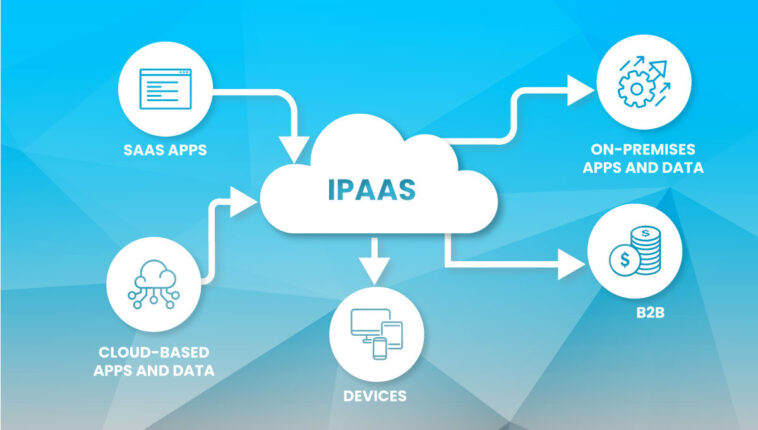
Integration Platform as a Service (iPaaS) is a cloud-based platform that enables organizations to connect, integrate, and manage data flows between multiple applications, systems, and services—both in the cloud and on-premises—without building complex custom integrations from scratch.
An iPaaS solution provides:
Pre-built connectors
Data transformation tools
Workflow automation
API management
Monitoring and error handling
In simple terms, iPaaS acts as a central hub that allows different systems to communicate with each other efficiently.
Why Integration Platform as a Service Is Important
Modern IT ecosystems are highly fragmented:
SaaS applications (CRM, ERP, HR, marketing tools)
Legacy on-premises systems
Cloud-native applications
APIs and microservices
Without a proper integration strategy, businesses face:
Data silos
Manual processes
Inconsistent information
Higher operational costs
An Integration Platform as a Service eliminates these issues by enabling scalable, automated, and reliable integrations.
How iPaaS Works
At a high level, an Integration Platform as a Service works through the following steps:
Connect
The platform connects to applications using pre-built connectors or APIs.Transform
Data is mapped and transformed to match the target system’s format.Orchestrate
Workflows define how and when data moves between systems.Monitor
Dashboards and alerts track integration performance and errors.
All of this happens in the cloud, without the need to manage servers or middleware.
Core Components of an Integration Platform as a Service
A typical iPaaS architecture includes the following components:
1. Connectors
Pre-built connectors for popular applications such as:
Salesforce
SAP
Microsoft Dynamics
Workday
AWS, Azure, Google Cloud
2. Data Mapping and Transformation
Visual tools to map fields, convert formats, and clean data.
3. Workflow Automation
Logic-based workflows that define triggers, conditions, and actions.
4. API Management
Tools for creating, publishing, securing, and managing APIs.
5. Monitoring and Analytics
Real-time visibility into integration health and performance.
Popular Integration Platform as a Service Examples
1. MuleSoft Anypoint Platform
MuleSoft is one of the most powerful enterprise-grade iPaaS solutions.
Key Features:
API-led connectivity
Hybrid and multi-cloud support
Advanced data transformation
Use Case:
A large enterprise integrates CRM, ERP, and legacy systems using MuleSoft to create a unified customer view.
2. Dell Boomi
Dell Boomi is a cloud-native Integration Platform as a Service known for ease of use.
Key Features:
Low-code integration
Pre-built connectors
Master data management
Real-World Example:
A mid-sized company connects Salesforce, NetSuite, and marketing tools to automate sales operations.
3. Informatica Intelligent Cloud Services (IICS)
Informatica provides a robust iPaaS solution focused on data integration and governance.
Key Features:
Data quality and governance
AI-powered data mapping
Enterprise security
4. Microsoft Power Automate (with Azure Integration Services)
Microsoft offers iPaaS capabilities through Power Automate and Azure Logic Apps.
Use Case:
Organizations automate workflows across Microsoft 365, Dynamics 365, and third-party SaaS apps.
5. Workato
Workato is a modern iPaaS designed for both IT and business users.
Key Features:
No-code/low-code automation
AI-driven recommendations
Strong SaaS integration support
Common Use Cases of Integration Platform as a Service
1. SaaS Application Integration
Synchronizing data between CRM, ERP, and HR systems.
2. Data Synchronization
Keeping customer, product, and financial data consistent across platforms.
3. Business Process Automation
Automating workflows such as order processing or employee onboarding.
4. Hybrid Integration
Connecting cloud applications with on-premises legacy systems.
5. API Enablement
Exposing internal systems as APIs for partners and developers.
Benefits of Using Integration Platform as a Service
1. Faster Time to Integration
Pre-built connectors reduce development time.
2. Reduced Costs
No need for custom middleware or heavy infrastructure.
3. Scalability
Cloud-native platforms scale with business growth.
4. Improved Data Accuracy
Automated integrations reduce human errors.
5. Agility and Flexibility
Quickly adapt integrations as business needs change.
Integration Platform as a Service
Integration Platform as a Service vs Traditional Integration
| Feature | Traditional Middleware | iPaaS |
|---|---|---|
| Deployment | On-premises | Cloud-based |
| Scalability | Limited | Highly scalable |
| Maintenance | High | Minimal |
| Development Speed | Slow | Fast |
| Cost Model | CapEx | OpEx |
An Integration Platform as a Service clearly offers a more agile and cost-effective approach.
iPaaS vs ESB (Enterprise Service Bus)
While ESB was popular in the past, iPaaS offers:
Cloud-first architecture
Better SaaS connectivity
Faster implementation
Lower operational overhead
Many organizations are now migrating from ESB to iPaaS.
Security and Compliance in iPaaS
Modern iPaaS platforms include:
Data encryption (in transit and at rest)
Role-based access control
Compliance with standards such as GDPR, ISO, and SOC 2
Secure API gateways
Security remains a shared responsibility between provider and customer.
Challenges of Integration Platform as a Service
Despite its advantages, iPaaS has some challenges:
Vendor lock-in
Performance limitations for extremely complex workflows
Dependency on internet connectivity
Licensing costs for enterprise-scale usage
Careful planning helps mitigate these risks.
Who Should Use Integration Platform as a Service?
iPaaS is ideal for:
Organizations using multiple SaaS applications
Enterprises with hybrid IT environments
Businesses undergoing digital transformation
Teams aiming to automate workflows quickly
Future Trends in Integration Platform as a Service
The future of iPaaS includes:
AI-driven integration and mapping
Event-driven architectures
Deeper API lifecycle management
Industry-specific integration templates
Integration platforms are evolving into intelligent automation hubs.
Conclusion
Integration Platform as a Service (iPaaS) has become a foundational technology for modern digital enterprises. By simplifying system integration, enabling automation, and reducing operational complexity, iPaaS allows organizations to unlock the full value of their applications and data.
From connecting SaaS tools to enabling hybrid cloud strategies, iPaaS plays a vital role in scalable, agile, and data-driven business operations. As IT environments continue to grow in complexity, adopting an Integration Platform as a Service is no longer optional—it is a strategic necessity.