What is Software as a Service (SaaS)?
In the modern digital era, cloud computing has transformed how businesses and individuals access technology. One of the most influential cloud service models is Software as a Service (SaaS). Instead of installing software on local computers or maintaining expensive IT infrastructure, users can access applications through the internet. This model has revolutionized software distribution, making it easier, faster, and more cost-effective for organizations of all sizes to use advanced digital tools.
This article explains what Software as a Service (SaaS) is, how it works, its advantages, examples, and why it has become one of the most dominant models in the cloud computing industry.
What is Software as a Service (SaaS)
Definition of Software as a Service (SaaS)
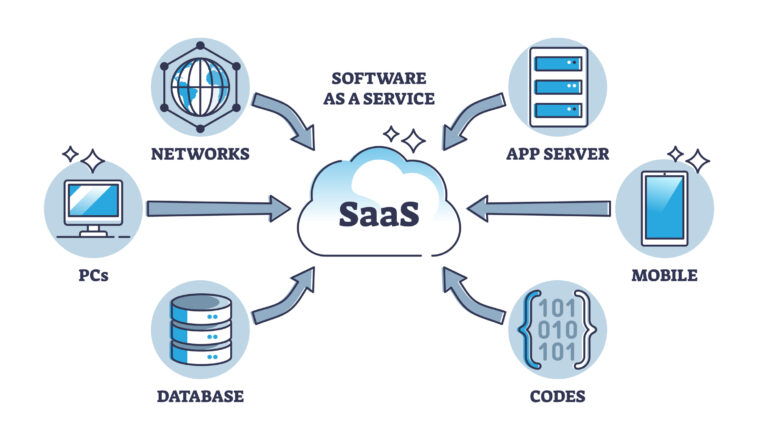
Software as a Service (SaaS) is a cloud-based software delivery model where applications are hosted by a provider and made available to users over the internet. Instead of purchasing software licenses and installing them on individual devices, users access the software through a web browser or a dedicated application.
In this model, the service provider manages everything, including:
Infrastructure
Servers
Databases
Software updates
Security
Maintenance
Users typically pay for SaaS applications through subscription-based pricing, such as monthly or yearly fees.
This approach eliminates the need for complex installations and reduces the burden on internal IT teams.
What is Software as a Service (SaaS)
How SaaS Works
SaaS applications are hosted on cloud servers managed by the service provider. These servers store application data and process user requests.
Here is how the process works:
Application Hosting
The SaaS provider hosts the application on remote servers in data centers.
Internet Access
Users access the software through the internet using a web browser or mobile application.
Subscription Model
Customers subscribe to the software and pay based on usage or number of users.
Automatic Updates
The provider regularly updates the software without requiring user intervention.
Data Security
The provider manages security, backups, and system monitoring.
Because everything runs in the cloud, users can access SaaS applications from any device with an internet connection.
What is Software as a Service (SaaS)
Key Characteristics of SaaS
Several characteristics define SaaS platforms and differentiate them from traditional software models.
1. Cloud-Based Delivery
SaaS software runs entirely on the cloud. Users do not need to install or maintain the application locally.
2. Subscription Pricing
Most SaaS platforms operate on a subscription basis rather than a one-time purchase.
3. Multi-Tenant Architecture
In SaaS systems, multiple users or organizations share the same infrastructure while keeping their data separate and secure.
4. Automatic Updates
Software updates, security patches, and new features are delivered automatically by the provider.
5. Accessibility
Users can access SaaS applications from anywhere, making them ideal for remote work and global teams.
What is Software as a Service (SaaS)
SaaS vs Traditional Software
Understanding the difference between SaaS and traditional software helps explain why SaaS has become so popular.
| Feature | Traditional Software | SaaS |
|---|---|---|
| Installation | Required | Not required |
| Updates | Manual updates | Automatic |
| Infrastructure | Managed by company | Managed by provider |
| Cost | Large upfront license | Subscription model |
| Accessibility | Local devices | Internet-based |
Because SaaS removes many technical barriers, organizations can adopt new tools faster and more efficiently.
What is Software as a Service (SaaS)
Popular Examples of SaaS Applications
Many of the most widely used digital tools today are SaaS applications.
1. Microsoft 365
Microsoft 365 provides cloud-based productivity tools such as Word, Excel, PowerPoint, and Outlook. It allows teams to collaborate in real time.
2. Google Workspace
Google Workspace includes Gmail, Google Docs, Google Drive, and Google Meet. It enables cloud-based document creation and communication.
3. Salesforce
Salesforce is one of the most popular Customer Relationship Management (CRM) SaaS platforms used by businesses to manage customer data, sales pipelines, and marketing campaigns.
4. Zoom
Zoom provides video conferencing services that allow individuals and businesses to host meetings, webinars, and virtual events.
5. Dropbox
Dropbox offers cloud storage and file-sharing services that allow teams to store and access files from anywhere.
These tools demonstrate how SaaS can serve various industries, from productivity to communication and data management.
What is Software as a Service (SaaS)
Advantages of SaaS
SaaS offers numerous benefits that make it attractive to businesses and individuals.
1. Cost Efficiency
Organizations do not need to purchase expensive hardware or maintain data centers. Instead, they pay a predictable subscription fee.
2. Easy Scalability
Businesses can easily add or remove users based on their needs. This flexibility is especially valuable for growing companies.
3. Accessibility and Mobility
Since SaaS applications are internet-based, users can work from anywhere using laptops, tablets, or smartphones.
4. Automatic Maintenance
Service providers handle maintenance, updates, and security patches, reducing the workload for internal IT teams.
5. Fast Deployment
Unlike traditional software that may take weeks to deploy, SaaS applications can often be implemented within minutes.
6. Collaboration
Many SaaS tools support real-time collaboration, allowing teams to work together more efficiently.
What is Software as a Service (SaaS)
Challenges and Limitations of SaaS
Despite its advantages, SaaS also has some potential challenges.
1. Internet Dependency
Since SaaS applications require internet access, users may experience disruptions if connectivity is poor.
2. Data Security Concerns
Organizations must trust providers to protect their sensitive data.
3. Limited Customization
Some SaaS applications offer limited customization compared to traditional software solutions.
4. Vendor Lock-In
Switching providers may be difficult if data migration is complex.
However, many modern SaaS platforms are continuously improving security, flexibility, and integration capabilities.
What is Software as a Service (SaaS)
SaaS in Different Industries
SaaS applications are used across many industries.
Healthcare
Hospitals use SaaS platforms for electronic health records (EHR), telemedicine, and patient management.
Education
Online learning platforms, learning management systems (LMS), and collaboration tools are commonly delivered through SaaS.
Finance
Banks and financial institutions use SaaS solutions for accounting, risk management, and analytics.
Retail and E-Commerce
Retail businesses use SaaS platforms for online stores, inventory management, and payment processing.
Marketing
Marketing teams rely on SaaS tools for email campaigns, analytics, and social media management.
What is Software as a Service (SaaS)
SaaS and Cloud Computing Models
SaaS is one of the three main cloud service models:
Infrastructure as a Service (IaaS)
Provides virtual servers, networking, and storage resources.
Examples include AWS EC2 and Microsoft Azure Virtual Machines.
Platform as a Service (PaaS)
Provides a development platform where developers can build applications without managing infrastructure.
Examples include Google App Engine and Azure App Service.
What is Software as a Service (SaaS)
Software as a Service (SaaS)
Delivers ready-to-use applications over the internet.
Examples include Slack, Salesforce, and Google Workspace.
Among these models, SaaS is the most user-friendly, as it requires the least technical management.
What is Software as a Service (SaaS)
Future Trends in SaaS
The SaaS industry continues to evolve rapidly. Several trends are shaping its future.
Artificial Intelligence Integration
Many SaaS platforms now integrate AI features such as predictive analytics, automation, and chatbots.
What is Software as a Service (SaaS)
Vertical SaaS
More SaaS solutions are being designed for specific industries like healthcare, legal services, and real estate.
Low-Code and No-Code Platforms
These tools allow users to build applications without programming knowledge.
Improved Cybersecurity
SaaS providers are investing heavily in security technologies to protect user data.
Global SaaS Market Growth
The global SaaS market is expected to grow significantly in the coming years as businesses continue digital transformation.
What is Software as a Service (SaaS)
Conclusion
Software as a Service (SaaS) has fundamentally changed the way software is delivered and used. By hosting applications in the cloud and providing access through the internet, SaaS eliminates the need for complex installations and expensive infrastructure. Businesses benefit from lower costs, greater flexibility, and improved collaboration.
With popular tools like Microsoft 365, Google Workspace, Salesforce, and Zoom leading the market, SaaS has become an essential component of modern digital operations. As technologies such as artificial intelligence, automation, and cloud security continue to advance, SaaS will play an even greater role in shaping the future of business and technology.
For organizations seeking efficient, scalable, and accessible software solutions, Software as a Service represents one of the most powerful innovations in the cloud computing era.
What is Software as a Service (SaaS)