Cloud Computing for Beginners
Cloud computing has become one of the most influential technologies shaping modern digital transformation. From individuals storing photos online to global corporations deploying large-scale applications, the cloud now powers almost every digital service we interact with. For beginners, however, cloud computing may appear complex due to its technical structure, terminology, and broad use cases.
This comprehensive guide explains cloud computing for beginners in simple, clear, and academic language. It covers key concepts, service models, deployment models, benefits, challenges, and real-world examples—giving new learners a solid foundation to understand and confidently navigate the cloud.
Cloud Computing for Beginners
What Is Cloud Computing?
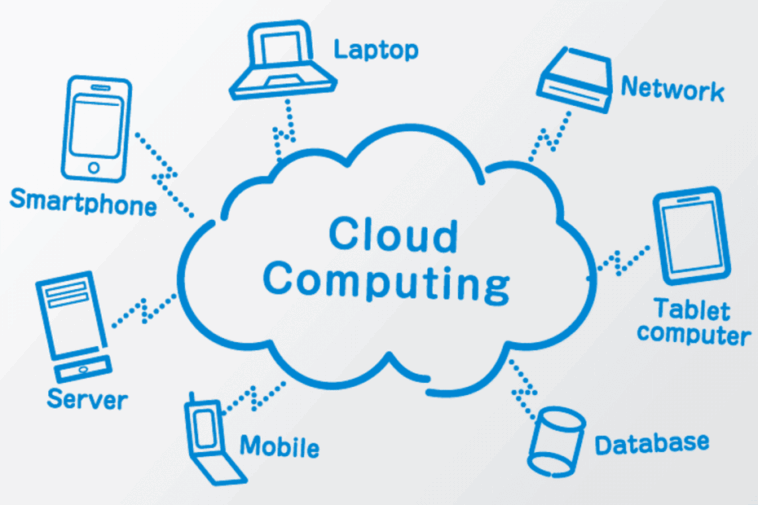
Cloud computing refers to the delivery of computing services—such as storage, servers, databases, networking, and software—over the internet (“the cloud”). Instead of buying physical hardware or installing software on local machines, users access these resources online through cloud providers.
Simple Definition for Beginners
Cloud computing allows you to use computing resources online without owning or managing the physical infrastructure.
Key Characteristics
To understand cloud computing for beginners, remember these essential characteristics:
On-demand access
Pay-as-you-go pricing
Global availability
Scalability and flexibility
Automated management
Cloud Computing for Beginners
Why Is Cloud Computing Important?
The rapid growth of cloud computing is driven by its ability to:
Reduce costs
Increase operational efficiency
Improve security and performance
Support remote and hybrid work
Enable innovation
Provide global accessibility
For beginners, it is crucial to see cloud computing not just as a technology, but as a strategy that simplifies operations and accelerates digital transformation.
Cloud Computing for Beginners
How Cloud Computing Works (Beginner-Friendly Explanation)
At the simplest level, cloud computing works through:
Cloud providers who own and manage physical data centers
Virtualization technology that turns physical hardware into virtual resources
Web-based interfaces or APIs that allow users to access these resources
Global networks that deliver services to users instantly and securely
Examples of Cloud Providers
Amazon Web Services (AWS)
Google Cloud Platform (GCP)
Microsoft Azure
IBM Cloud
Oracle Cloud
Cloud Computing for Beginners
Cloud Service Models Explained for Beginners
To master cloud computing for beginners, it is essential to understand the three core cloud service models.
1 IaaS – Infrastructure as a Service
IaaS provides the fundamental computing resources:
Virtual machines (VMs)
Storage
Networking
Firewalls
Load balancers
You control: OS, applications, data
Provider controls: hardware, virtualization, physical data centers
Examples: AWS EC2, Google Compute Engine, Azure VM
2 PaaS – Platform as a Service
PaaS provides a ready-made platform for developers to build applications without managing servers or OS.
You control: applications, code, testing
Provider controls: OS, servers, runtime, middleware
Examples: Google App Engine, AWS Elastic Beanstalk, Heroku
3 SaaS – Software as a Service
SaaS delivers software applications over the internet.
You control: how you use the application
Provider controls: everything else (updates, security, servers)
Examples:
Gmail
Google Drive
Salesforce
Dropbox
Slack
Cloud Deployment Models for Beginners
Understanding deployment models is essential for selecting the right cloud environment.
1 Public Cloud
Open to everyone
Managed by third-party providers
Most cost-efficient
Examples: AWS, Azure, Google Cloud
2 Private Cloud
Used by a single organization
More secure and customizable
Higher cost
Examples: VMware private cloud, OpenStack
3 Hybrid Cloud
Mix of public + private cloud
Ideal for sensitive + non-sensitive workloads
4 Multi-Cloud
Using multiple cloud providers simultaneously
Helps avoid vendor lock-in
Advantages of Cloud Computing for Beginners
Cloud computing offers numerous benefits, even for individuals or small teams.
6.1 Cost Efficiency
No upfront cost for hardware or data centers.
6.2 Flexibility and Scalability
You can increase or decrease resources instantly.
6.3 Accessibility
Cloud services run anywhere with an internet connection.
6.4 High Security
Cloud providers offer advanced security solutions.
6.5 Automatic Updates
No need to manually install updates—cloud providers handle everything.
6.6 Business Continuity
Cloud backups ensure you never lose important data.
Common Use Cases of Cloud Computing
7.1 Storage and Backup
Google Drive, OneDrive, Amazon S3
7.2 Web Hosting
Cloud servers for websites, blogs, and e-commerce
7.3 Application Development
Developers use PaaS platforms to build modern applications
7.4 Big Data and Analytics
Cloud services process large datasets for insights
7.5 Machine Learning and AI
Cloud platforms provide AI models and GPUs on demand
7.6 Virtual Desktops
VDI solutions like Amazon WorkSpaces and Citrix VDI
Cloud Computing Challenges for Beginners
While the cloud offers many advantages, beginners should be aware of potential challenges.
8.1 Learning Curve
Understanding new tools and cloud environments can take time.
8.2 Security Misconfigurations
Security risks mostly arise from incorrect user settings, not the cloud provider.
8.3 Cost Mismanagement
Without proper monitoring, cloud expenses can grow unexpectedly.
8.4 Dependency on Internet
Cloud services require a stable and reliable internet connection.
Essential Cloud Computing Skills for Beginners
If you want to start a cloud career, focus on building these skills:
Technical Skills
Understanding cloud architecture
Basic networking
Linux fundamentals
Virtualization concepts
Storage systems
Security basics
Tools & Platforms
AWS Management Console
Google Cloud Console
Azure Portal
Docker & Kubernetes (containers and orchestration)
Soft Skills
Analytical thinking
Problem-solving
Adaptability
Continuous learning mindset
Step-by-Step Learning Path: Cloud Computing for Beginners
To help beginners start their cloud journey, here is a structured path:
Step 1: Understand the Basics
What is the cloud?
Types of services (IaaS, PaaS, SaaS)
Deployment models
Step 2: Choose a Cloud Platform
Most beginners start with:
AWS (most popular)
Google Cloud (beginner-friendly)
Azure (enterprise-focused)
Step 3: Practice on Free Tiers
Use free accounts offered by:
AWS Free Tier
GCP Free Tier
Azure Free Account
Step 4: Learn Key Services
Compute (VMs, serverless)
Storage
Databases
Networking
Step 5: Work on Simple Projects
Examples:
Host a website
Deploy a database
Build a virtual machine
Create a serverless function
Step 6: Earn Certifications
Great certifications for beginners:
AWS Cloud Practitioner
Google Associate Cloud Engineer
Microsoft Azure Fundamentals
Future of Cloud Computing
Cloud computing continues to evolve. Trends shaping its future include:
Serverless architecture
AI-powered cloud services
Quantum computing integration
Edge computing
Multi-cloud orchestration
These advancements ensure that cloud computing will remain a critical skill for decades.
Conclusion
This guide offers a comprehensive overview of cloud computing for beginners, introducing the essential concepts, benefits, service models, and learning paths. As organizations accelerate their digital transformation, understanding cloud computing is no longer optional—it is a fundamental skill for anyone entering the modern tech world.
Whether you are a student, a job seeker, or a business owner, cloud computing provides the foundation to build scalable, secure, and innovative digital solutions. As you continue your learning journey, hands-on practice and certification will help you grow from beginner to professional.