Desktop as a Service (DaaS): Revolutionizing the Modern Workspace
The modern enterprise landscape is rapidly evolving. Globalization, remote work, and cloud adoption have transformed how organizations operate and deliver digital services. Traditional desktop infrastructure, where each user relies on a local PC or laptop, is increasingly inefficient, costly, and difficult to secure. Enter Desktop as a Service (DaaS), a cloud-based solution that delivers fully managed virtual desktops to users over the internet, enabling organizations to streamline IT operations, enhance security, and provide employees with anywhere-accessible digital workspaces.
DaaS is more than just virtualization; it represents a strategic shift in how IT delivers desktops, applications, and data. By centralizing management and leveraging cloud scalability, DaaS empowers organizations to meet modern workforce demands while reducing complexity and operational costs.
Desktop as a Service (DaaS)
Understanding Desktop as a Service
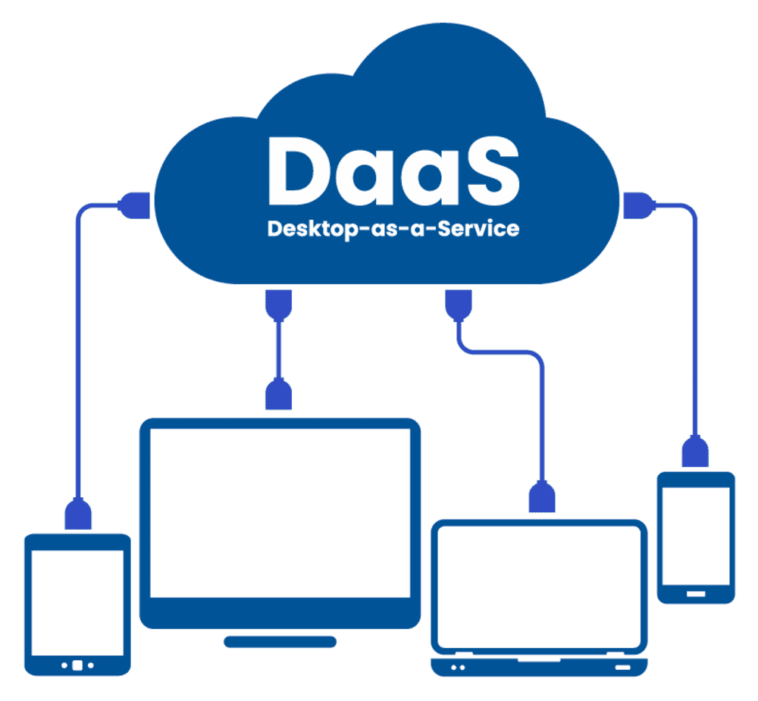
Desktop as a Service (DaaS) is a cloud computing offering where virtual desktops, complete with operating systems, applications, and data, are delivered as a subscription service from cloud providers. Unlike traditional Virtual Desktop Infrastructure (VDI), which requires extensive on-premises infrastructure and management, DaaS eliminates most of the operational burden.
Users can access their virtual desktops through laptops, tablets, thin clients, or even web browsers. The desktops are hosted in secure cloud data centers, allowing users to work seamlessly from any location while IT retains centralized control over security, updates, and compliance.
At its core, DaaS leverages Infrastructure as a Service (IaaS) resources, virtual machine orchestration, and remote display protocols to deliver a desktop experience that mirrors a local PC. However, the key differentiator is that the infrastructure is fully managed and maintained by the service provider, enabling organizations to focus on business outcomes rather than IT operations.
Desktop as a Service (DaaS)
How DaaS Works
DaaS solutions consist of multiple components that work together to provide a reliable and secure virtual desktop environment:
Virtualization Layer: Hypervisors host multiple virtual desktops on shared cloud servers, providing isolated environments for each user.
Management Platform: The DaaS provider manages the lifecycle of virtual desktops, including provisioning, updates, backup, and monitoring.
Connection Broker: This system authenticates users, assigns desktops, and manages session persistence, ensuring seamless access.
Storage and Data Management: Centralized cloud storage holds user data, ensuring secure, redundant, and highly available access.
Display Protocols: Remote display technologies such as PCoIP or HDX transmit the desktop interface efficiently, maintaining a responsive experience across devices and network conditions.
By combining these elements, DaaS abstracts the physical hardware entirely, allowing users to interact with a fully functional desktop while all processing occurs in the cloud.
Desktop as a Service (DaaS)
Types of DaaS
DaaS solutions can be classified based on user requirements, deployment models, and provider architectures:
Persistent Desktops: Each user has a dedicated virtual desktop that retains settings, files, and customizations between sessions. This is ideal for employees who require personalized work environments or specialized software.
Non-Persistent Desktops: Desktops are reset after each session, ensuring a clean environment for every login. This model is efficient for temporary staff, training environments, or standard office workflows.
Managed vs. Unmanaged DaaS: Some providers fully manage updates, security, and performance monitoring, while others provide infrastructure that the organization manages themselves, offering more control but requiring internal IT resources.
Cloud Deployment Models: DaaS can be hosted on public clouds (AWS, Azure, Google Cloud), private clouds, or hybrid setups, depending on regulatory and performance needs.
These variations allow organizations to adopt DaaS flexibly, matching business requirements with cost, security, and performance considerations.
Desktop as a Service (DaaS)
Key Benefits of DaaS
The advantages of adopting DaaS extend across IT, business operations, security, and user experience:
1. Cost Efficiency
DaaS converts capital expenditure into predictable operating costs. Organizations avoid investing in physical desktops, servers, and data center resources, paying only for the virtual desktops they use. Thin clients and repurposed hardware can further reduce costs.
2. Simplified IT Management
Centralized administration enables IT teams to provision desktops, deploy updates, and enforce policies from a single console. Maintenance tasks, including security patching and disaster recovery, are handled by the provider, freeing IT staff to focus on strategic initiatives.
3. Enhanced Security
Since desktops and data are hosted centrally in secure data centers, risks associated with lost or stolen devices are minimized. Centralized backup, encryption, multi-factor authentication, and endpoint monitoring provide multiple layers of protection. Security policies can be enforced consistently across all users and locations.
4. Scalability and Flexibility
DaaS allows organizations to scale desktops up or down rapidly. Seasonal or project-based workforce requirements can be accommodated without investing in physical hardware, enabling rapid deployment of temporary or remote employees.
5. Remote and Hybrid Workforce Support
In the era of remote and hybrid work, DaaS allows employees to access corporate desktops from anywhere, using almost any device. This enhances productivity and ensures business continuity, even when physical offices are inaccessible.
6. Disaster Recovery and Business Continuity
Cloud-hosted desktops are inherently resilient. Backups, replication, and geographic redundancy ensure that users can continue working without interruption, even during localized outages or disasters.
Desktop as a Service (DaaS)
Industry Use Cases
DaaS adoption spans multiple sectors due to its versatility and security features:
Healthcare: Ensures HIPAA-compliant access to patient records, enabling secure remote consultations.
Finance: Supports high-security requirements, centralizing sensitive data while providing real-time access for analysts and traders.
Education: Provides students with virtual access to specialized applications and labs, eliminating the need for high-end personal devices.
Manufacturing and Design: GPU-enabled DaaS desktops support CAD, simulation, and graphics-intensive workflows remotely.
Government: Centralized control ensures compliance with regulatory standards while enabling secure remote work.
Each industry leverages DaaS to reduce costs, improve operational efficiency, and maintain secure access to digital workspaces.
Desktop as a Service (DaaS)
Integration with Modern IT Strategies
DaaS aligns with broader IT modernization initiatives, including cloud-first strategies, digital transformation, and zero-trust security models.
Cloud-Native IT: DaaS can integrate with existing cloud services, SaaS applications, and storage platforms to provide a unified digital workspace.
Security and Compliance: By centralizing desktops, organizations can enforce zero-trust policies, monitor endpoint access continuously, and ensure compliance with industry regulations.
Hybrid and Multi-Cloud Integration: DaaS solutions can work seamlessly with hybrid deployments, enabling organizations to balance workloads between private and public clouds.
Automation and Management: APIs and automation frameworks allow DaaS environments to integrate with enterprise IT service management (ITSM) and DevOps tools, improving agility and operational efficiency.
Desktop as a Service (DaaS)
Performance Optimization in DaaS
Delivering high-performance virtual desktops is critical to adoption. Key techniques include:
Remote Display Protocols: Advanced protocols such as VMware Blast Extreme or Citrix HDX compress and optimize data transfer for latency-sensitive applications.
GPU Virtualization: Graphics-intensive workloads benefit from virtualized GPUs, enabling CAD, AI, or media editing applications.
Edge Connectivity: Deploying edge servers closer to end-users reduces latency, improving responsiveness for global workforces.
Dynamic Resource Allocation: Cloud infrastructure can scale CPU, memory, and storage dynamically based on user demand, ensuring consistent performance.
These optimizations ensure that DaaS desktops are virtually indistinguishable from physical desktops in user experience.
Desktop as a Service (DaaS)
Challenges in DaaS Adoption
While DaaS offers numerous benefits, organizations must consider potential challenges:
Network Dependence: Performance relies on network stability and bandwidth; low-quality connections can degrade the user experience.
Licensing Complexity: Managing operating system licenses, application subscriptions, and virtualization rights can be intricate.
Change Management: Users accustomed to physical desktops may require training to adapt to virtual environments.
Vendor Lock-In: Organizations should evaluate provider flexibility to avoid dependency on a single cloud platform or technology stack.
Cost Management: Without careful monitoring, variable subscription costs can escalate in large deployments.
Proper planning, pilot deployments, and governance policies mitigate these risks and ensure a smooth transition.
Desktop as a Service (DaaS)
Desktop as a Service (DaaS)
Leading DaaS Providers
Several providers dominate the enterprise DaaS market, each offering unique capabilities:
VMware Horizon Cloud: Offers flexible deployment on private or public clouds, with strong integration into VMware’s virtualization ecosystem.
Citrix Managed Desktops: Known for high-performance protocols and comprehensive security features, supporting graphics-intensive applications.
Microsoft Azure Virtual Desktop: A cloud-native solution integrated with Microsoft 365, providing seamless Windows 10 and 11 desktops.
Amazon WorkSpaces: Simplifies cloud desktop deployment with pay-as-you-go pricing, scalability, and global reach.
These providers cater to different enterprise needs, from small teams requiring rapid deployment to large-scale organizations demanding high security and compliance.
Desktop as a Service (DaaS)
The Future of DaaS
The future of DaaS is intertwined with cloud innovation, AI-driven management, and edge computing.
Artificial Intelligence: Predictive analytics will optimize resource allocation and preempt performance bottlenecks.
Edge Computing: Distributed infrastructure will reduce latency and improve user experience for global workforces.
Integrated Workspaces: DaaS will increasingly merge desktops, applications, and collaboration tools into unified digital workspaces.
Security Evolution: Zero-trust and continuous verification models will further strengthen endpoint and data protection.
As enterprises continue embracing cloud-first strategies and hybrid work models, DaaS will evolve from a virtualization solution into a central platform for the modern digital workspace.
Desktop as a Service (DaaS)
Conclusion
Desktop as a Service (DaaS) is transforming the way organizations deliver, secure, and manage desktops. By providing cloud-hosted, fully managed virtual desktops, DaaS reduces operational complexity, enhances security, and enables a flexible, remote-ready workforce.
For businesses seeking scalability, cost efficiency, and modern digital workplace capabilities, DaaS is more than a technology — it is a strategic enabler of digital transformation. As cloud platforms mature and edge computing and AI integration advance, DaaS will continue to redefine what a desktop is, where it lives, and how users interact with it.
Organizations that adopt DaaS today position themselves to thrive in the increasingly dynamic, remote, and cloud-first business environment of tomorrow.
Desktop as a Service (DaaS)