PaaS vs IaaS vs SaaS: Examples and Use Cases
Cloud computing has fundamentally transformed the way organizations build, deploy, and manage applications. Instead of purchasing expensive hardware and maintaining complex IT infrastructure, businesses can now access powerful computing resources through the internet. At the heart of this transformation are three primary cloud service models: Infrastructure as a Service (IaaS), Platform as a Service (PaaS), and Software as a Service (SaaS).
These models represent different levels of abstraction in cloud computing. Each provides a unique balance between control, flexibility, and convenience. Understanding the differences between them is essential for organizations looking to choose the right cloud strategy for their workloads.
This guide explores the differences between PaaS, IaaS, and SaaS, along with real-world examples and practical use cases to help you determine which model best fits your needs.
PaaS vs IaaS vs SaaS: Examples and Use Cases
Understanding the Cloud Service Models
Before diving into comparisons, it is important to understand how these models fit within the broader ecosystem of **Cloud Computing.
In traditional IT infrastructure, organizations are responsible for everything—from physical servers and networking equipment to operating systems, applications, and data management. Cloud computing changes this by shifting some or all of these responsibilities to cloud providers.
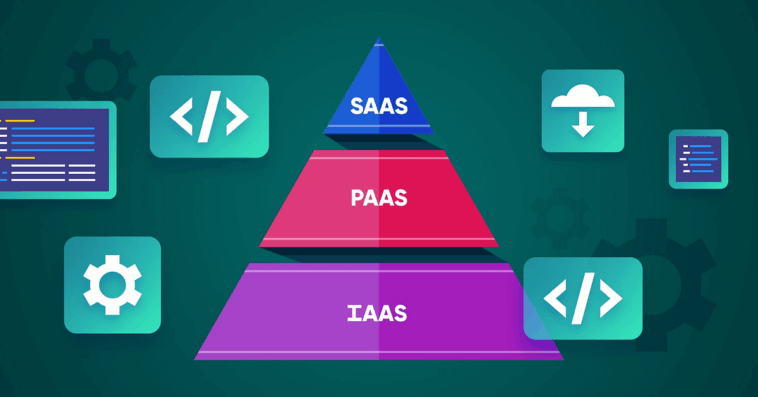
The three main service models differ in how much responsibility the provider takes on.
IaaS offers the most control by providing virtualized infrastructure.
PaaS offers a development platform that simplifies application deployment.
SaaS delivers fully functional software accessible through a web browser.
As we move from IaaS to SaaS, the cloud provider manages more of the underlying technology, allowing users to focus more on their core tasks.
PaaS vs IaaS vs SaaS: Examples and Use Cases
Infrastructure as a Service (IaaS)
Infrastructure as a Service (IaaS) is the most flexible cloud service model. It provides virtualized computing resources over the internet, including servers, storage, and networking.
With IaaS, organizations can rent IT infrastructure instead of purchasing and maintaining physical hardware. This model allows businesses to scale resources on demand while maintaining full control over operating systems, applications, and configurations.
Key Features of IaaS
IaaS platforms typically offer:
Virtual machines and compute instances
Scalable storage systems
Virtual networking capabilities
Load balancing and firewalls
Pay-as-you-go pricing models
Because users manage operating systems and applications themselves, IaaS provides maximum flexibility.
PaaS vs IaaS vs SaaS: Examples and Use Cases
Examples of IaaS Platforms
Some of the most widely used IaaS platforms include:
Amazon Web Services – Offers services such as EC2 virtual servers and S3 storage.
Microsoft Azure – Provides scalable virtual machines and enterprise cloud infrastructure.
Google Cloud Platform – Offers high-performance computing and global infrastructure services.
DigitalOcean – Known for developer-friendly virtual servers called droplets.
PaaS vs IaaS vs SaaS: Examples and Use Cases
Use Cases for IaaS
IaaS is ideal for organizations that require flexibility and infrastructure control.
1. Hosting Websites and Web Applications
Businesses often use IaaS to host websites that require scalable infrastructure.
2. Disaster Recovery and Backup
Companies use cloud infrastructure to replicate systems and recover data during outages.
3. High-Performance Computing
Industries such as research, engineering, and finance rely on IaaS for processing large datasets.
4. Development and Testing Environments
Developers can quickly create virtual environments without investing in physical hardware.
PaaS vs IaaS vs SaaS: Examples and Use Cases
Platform as a Service (PaaS)
Platform as a Service (PaaS) provides a complete development environment in the cloud. It allows developers to build, test, and deploy applications without managing the underlying infrastructure.
Instead of configuring servers or maintaining operating systems, developers can focus entirely on writing code and building features.
Key Features of PaaS
Typical PaaS capabilities include:
Application development frameworks
Integrated development tools
Automated scaling
Database management
Built-in security and monitoring
PaaS platforms simplify application deployment by providing a ready-to-use environment.
PaaS vs IaaS vs SaaS: Examples and Use Cases
Examples of PaaS Platforms
Several major technology companies offer PaaS solutions:
Google Cloud Platform – Provides services like App Engine for scalable application hosting.
Microsoft Azure – Offers Azure App Service for building and deploying web applications.
Heroku – A developer-focused PaaS known for simplicity and rapid deployment.
Red Hat – Offers OpenShift, a powerful container-based PaaS platform.
PaaS vs IaaS vs SaaS: Examples and Use Cases
Use Cases for PaaS
PaaS is particularly valuable for software development teams.
1. Application Development
Developers can build applications without worrying about server management.
2. API Development
PaaS environments simplify the creation and deployment of APIs.
3. Microservices Architecture
Modern applications often use microservices that benefit from scalable PaaS platforms.
4. DevOps Automation
PaaS integrates continuous integration and continuous deployment pipelines.
PaaS vs IaaS vs SaaS: Examples and Use Cases
Software as a Service (SaaS)
Software as a Service (SaaS) represents the most accessible cloud model. Instead of installing software locally, users access applications through the internet.
The cloud provider manages everything—from infrastructure and security to updates and maintenance.
Key Features of SaaS
SaaS platforms typically offer:
Browser-based access
Automatic software updates
Subscription pricing
Multi-tenant architecture
Remote accessibility
Because the provider handles all technical maintenance, SaaS allows users to focus purely on using the software.
PaaS vs IaaS vs SaaS: Examples and Use Cases
Examples of SaaS Applications
Many popular digital tools are SaaS applications:
Google Workspace – A cloud productivity suite including Docs, Sheets, and Gmail.
Microsoft 365 – Cloud-based office applications and collaboration tools.
Salesforce – A leading cloud CRM platform used by businesses worldwide.
Slack – A team collaboration and communication platform.
Dropbox – A cloud storage and file sharing service.
PaaS vs IaaS vs SaaS: Examples and Use Cases
Use Cases for SaaS
SaaS applications are widely used across industries.
1. Business Productivity
Organizations rely on SaaS tools for communication, document management, and collaboration.
2. Customer Relationship Management
CRM platforms help businesses track customer interactions and sales pipelines.
3. E-Commerce Platforms
Online store builders allow companies to launch digital stores quickly.
4. Remote Work and Collaboration
SaaS tools enable distributed teams to work from anywhere.
PaaS vs IaaS vs SaaS: Examples and Use Cases
Key Differences Between PaaS, IaaS, and SaaS
Understanding how these models differ can help organizations choose the right solution.
| Feature | IaaS | PaaS | SaaS |
|---|---|---|---|
| Control Level | Highest | Moderate | Lowest |
| Infrastructure Management | User | Provider | Provider |
| Application Development | User | User | Provider |
| Typical Users | IT teams | Developers | End users |
| Customization | Very high | High | Limited |
In simple terms:
IaaS provides the building blocks of cloud infrastructure.
PaaS provides tools for building applications.
SaaS provides ready-to-use software.
PaaS vs IaaS vs SaaS: Examples and Use Cases
Choosing the Right Cloud Model
Selecting the right service model depends on business goals, technical expertise, and operational needs.
Organizations should consider the following factors:
Level of Control
Companies requiring full control over infrastructure should choose IaaS.
Development Requirements
Teams building custom applications benefit from PaaS platforms.
Ease of Use
Businesses that want ready-to-use solutions without technical complexity should adopt SaaS.
Scalability Needs
All three models offer scalability, but IaaS and PaaS provide more flexibility for custom workloads.
PaaS vs IaaS vs SaaS: Examples and Use Cases
How Businesses Combine the Three Models
In practice, many organizations use all three cloud service models simultaneously.
For example:
Developers may build applications using PaaS.
The application may run on IaaS infrastructure.
Employees may use SaaS tools for collaboration and productivity.
This layered approach allows businesses to balance flexibility, efficiency, and cost.
The Future of Cloud Service Models
As cloud technology continues to evolve, the lines between IaaS, PaaS, and SaaS are becoming less rigid. Modern cloud ecosystems now include additional models such as serverless computing, container platforms, and hybrid cloud environments.
However, the fundamental structure of cloud services remains rooted in these three models.
Organizations that understand how IaaS, PaaS, and SaaS differ—and how they complement one another—are better positioned to design scalable, secure, and efficient cloud architectures.
PaaS vs IaaS vs SaaS: Examples and Use Cases
Conclusion
The three primary cloud service models—IaaS, PaaS, and SaaS—represent different ways of delivering technology through the cloud. Each model serves a specific purpose and offers unique advantages.
IaaS provides flexible infrastructure for organizations that require full control over computing resources. PaaS simplifies application development by offering a ready-to-use platform for developers. SaaS delivers complete software solutions that users can access instantly through the internet.
By understanding the strengths and use cases of each model, businesses can select the right cloud strategy to improve efficiency, reduce costs, and accelerate innovation in an increasingly digital world.
PaaS vs IaaS vs SaaS: Examples and Use Cases