Three Main Cloud Computing Service Models
Cloud computing has become the backbone of modern digital transformation. From startups launching their first applications to global enterprises running mission-critical systems, organizations of all sizes rely on cloud technologies to innovate faster, reduce costs, and scale efficiently.
One of the most common questions asked by beginners and decision-makers alike is:
What are the three main cloud computing service models?
Understanding these service models is essential for choosing the right cloud strategy, optimizing costs, and designing secure and scalable systems. In this article, we will explore the three main cloud computing service models in detail, explain how they differ, provide real-world examples, and help you understand when to use each one.
Understanding Cloud Computing Service Models
Before answering what are the three main cloud computing service models, it is important to understand what a service model means in the context of cloud computing.
A cloud service model defines:
Who manages the infrastructure
Who controls the platform
Who is responsible for applications, data, and security
How much control and flexibility the customer has
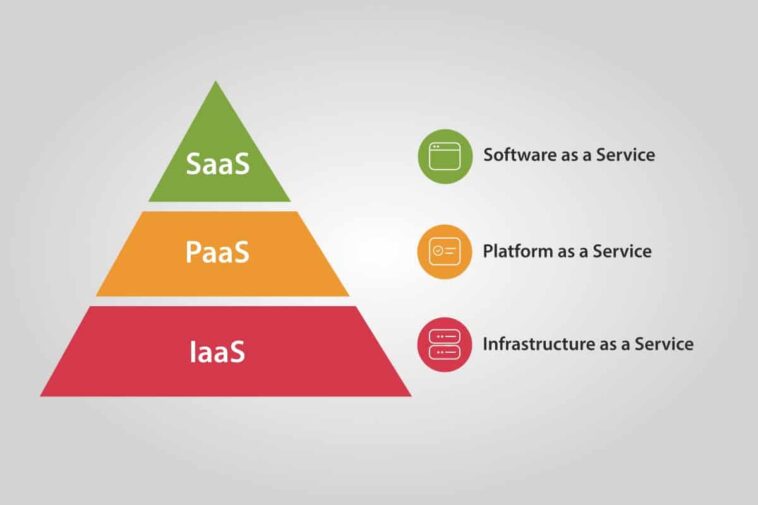
The three main cloud computing service models are:
Each model offers a different balance between control and convenience.
Three Main Cloud Computing Service Models
1. Infrastructure as a Service (IaaS)
What Is IaaS?
Infrastructure as a Service (IaaS) is the most flexible cloud computing service model. It provides fundamental computing resources such as virtual machines, storage, and networking over the internet.
With IaaS, the cloud provider manages the physical infrastructure, while the customer manages:
Operating systems
Applications
Data
Security configurations
Key Features of IaaS
On-demand virtual servers
Scalable storage solutions
Advanced networking capabilities
Pay-as-you-go pricing
Full control over the environment
Popular IaaS Providers
Amazon Web Services (EC2)
Microsoft Azure Virtual Machines
Google Compute Engine
Oracle Cloud Infrastructure
Real-World Example of IaaS
An e-commerce company hosts its website on virtual machines. During high-traffic events such as holiday sales, it scales servers automatically. When traffic drops, unused resources are shut down to reduce costs.
When to Use IaaS
Migrating legacy applications
Running custom enterprise systems
Disaster recovery solutions
Organizations requiring maximum control
2. Platform as a Service (PaaS)
What Is PaaS?
Platform as a Service (PaaS) provides a complete development and deployment environment in the cloud. It removes the need to manage operating systems and infrastructure, allowing developers to focus entirely on building applications.
In this model, the provider manages:
Servers
Operating systems
Runtime environments
Middleware
The customer manages:
Application code
Data
Application configurations
Key Features of PaaS
Faster application development
Built-in scalability
Integrated development tools
Automated updates and patching
Support for multiple programming languages
Popular PaaS Platforms
Microsoft Azure App Service
Google App Engine
AWS Elastic Beanstalk
Heroku
Real-World Example of PaaS
A startup builds a mobile backend using a PaaS platform. Developers deploy code directly without worrying about server management. As the user base grows, the platform automatically scales.
When to Use PaaS
Application development and testing
Agile and DevOps environments
Startups and small teams
Rapid innovation projects
3. Software as a Service (SaaS)
What Is SaaS?
Software as a Service (SaaS) delivers fully functional software applications over the internet. Users access the software through a web browser without installing or maintaining anything locally.
In this model, the cloud provider manages:
Infrastructure
Platform
Application
Security
Updates and maintenance
The customer simply uses the software.
Key Features of SaaS
No installation required
Accessible from any device
Automatic updates
Subscription-based pricing
Minimal technical expertise needed
Popular SaaS Applications
Google Workspace
Microsoft 365
Salesforce
Zoom
Dropbox
Real-World Example of SaaS
A company uses an online CRM system to manage customer relationships. Employees log in via a browser, and the provider handles updates, security, and uptime.
When to Use SaaS
Business productivity tools
Customer relationship management
Email and collaboration platforms
Organizations seeking simplicity
Three Main Cloud Computing Service Models
Comparing the Three Main Cloud Computing Service Models
To better understand what are the three main cloud computing service models, let’s compare them side by side.
| Feature | IaaS | PaaS | SaaS |
|---|---|---|---|
| Infrastructure management | Customer | Provider | Provider |
| Platform management | Customer | Provider | Provider |
| Application management | Customer | Customer | Provider |
| Control level | High | Medium | Low |
| Ease of use | Moderate | High | Very high |
| Ideal users | IT teams | Developers | End users |
This comparison highlights the trade-off between control and convenience.
Shared Responsibility Model in Cloud Computing
Understanding the shared responsibility model is crucial when discussing cloud service models.
In IaaS, customers are responsible for most layers above the infrastructure.
In PaaS, responsibilities are shared more evenly.
In SaaS, the provider handles almost everything.
Security and compliance responsibilities change depending on the chosen model.
How Businesses Choose the Right Cloud Service Model
Choosing the right model depends on:
Technical expertise
Budget
Security requirements
Compliance needs
Application complexity
Many organizations use a combination of all three models to meet different business needs.
Industry Use Cases for Cloud Service Models
Different industries leverage cloud service models in unique ways:
Finance: IaaS for core systems, SaaS for analytics
Healthcare: Private IaaS and SaaS for patient management
Education: SaaS for collaboration, PaaS for custom apps
Retail: IaaS for scalability, PaaS for innovation
Three Main Cloud Computing Service Models
Advantages of Understanding Cloud Service Models
Knowing what are the three main cloud computing service models helps organizations:
Reduce operational costs
Improve scalability
Enhance security planning
Accelerate digital transformation
Make informed cloud investment decisions
Future of Cloud Computing Service Models
Cloud service models continue to evolve with:
Serverless computing
AI-driven platforms
Industry-specific SaaS solutions
Hybrid and multi-cloud strategies
However, IaaS, PaaS, and SaaS remain the foundation of cloud computing.
Conclusion
So, what are the three main cloud computing service models?
The answer is Infrastructure as a Service (IaaS), Platform as a Service (PaaS), and Software as a Service (SaaS).
Each model serves a different purpose, offers a unique balance of control and convenience, and addresses specific business needs. By understanding these models, organizations can design smarter cloud strategies, optimize resources, and stay competitive in an increasingly digital world.