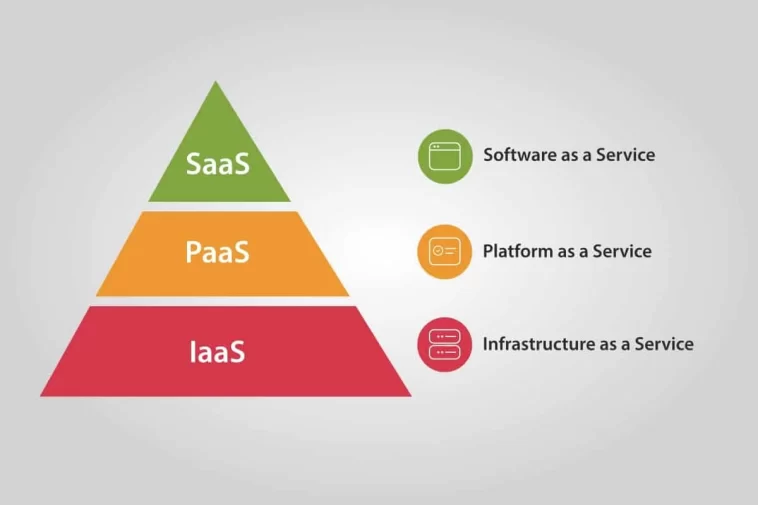
Cloud Computing Service Models Diagram
Cloud computing has evolved into one of the most transformative paradigms in modern information technology, enabling organizations to scale rapidly, reduce operational costs, and innovate at unprecedented speeds. Understanding cloud architectures requires a clear grasp of cloud service models and their layered structure. For this reason, the cloud computing service models diagram has become a widely adopted visual representation that illustrates the hierarchical nature of Infrastructure as a Service (IaaS), Platform as a Service (PaaS), and Software as a Service (SaaS). This diagram provides an intuitive way to understand responsibilities, abstraction levels, and operational roles within cloud ecosystems.
This article presents a complete academic explanation of cloud service models, analyzes the logic of the cloud computing service models diagram, and explains how each model supports modern digital transformation strategies.
Cloud Service Models
Cloud service models define how computing resources are provisioned, managed, and consumed over the internet. Each model represents a different degree of abstraction, responsibility, and control. The cloud computing service models diagram typically arranges these models in a layered pyramid, with IaaS at the base, PaaS in the middle, and SaaS at the top. This structure reflects increasing levels of abstraction and decreasing levels of user responsibility.
Why Cloud Service Models Matter
Organizations choose cloud service models based on factors such as:
Technical expertise
Required control and customization
Speed of deployment
Application complexity
Security and compliance needs
The diagram helps decision-makers visualize which model fits their workload requirements and operational goals.
Understanding the Cloud Computing Service Models Diagram
The cloud computing service models diagram usually consists of three stacked layers, representing:
IaaS (Infrastructure as a Service) – foundational layer
PaaS (Platform as a Service) – development and deployment layer
SaaS (Software as a Service) – application consumption layer
Below is an academic breakdown of each layer and why the diagram positions them in this sequence.
Layer 1: Infrastructure as a Service (IaaS)
IaaS occupies the bottom of the diagram because it represents the core cloud infrastructure required to run higher-level services. It provides virtualized computing resources such as:
Virtual machines (VMs)
Storage
Networking
Load balancers
Firewalls
Customer Responsibilities in IaaS:
Applications
Data
Runtime
Middleware
Operating systems
Provider Responsibilities:
Servers
Hypervisors
Storage hardware
Networking equipment
IaaS is ideal for organizations seeking maximal flexibility and control over their computing environments.
Layer 2: Platform as a Service (PaaS)
PaaS sits in the middle of the cloud computing service models diagram because it abstracts infrastructure complexities and focuses on software development environments. It provides:
Programming frameworks
Database services
Container orchestration
DevOps pipelines
Runtime environments
Customer Responsibilities in PaaS:
Applications
Data
Provider Responsibilities:
Runtime
Middleware
Operating systems
Virtualization
Networking
Storage
This model accelerates development by eliminating infrastructure management tasks.
Layer 3: Software as a Service (SaaS)
SaaS sits at the top of the diagram, representing the highest level of abstraction. It offers ready-to-use software applications delivered over the internet. Users simply log in and begin using the application without installation or maintenance.
Examples include:
CRM systems
Email services
Collaboration platforms
Accounting and ERP tools
Provider Responsibilities:
Everything—from applications and data to infrastructure.
The SaaS model is the simplest for end-users but offers the least customization compared to the other layers.
The Logic Behind the Diagram’s Layered Design
The hierarchical structure of the cloud computing service models diagram is not arbitrary. It reflects:
1 Increasing Abstraction
From IaaS → PaaS → SaaS, the abstraction level increases. Users progressively manage fewer components.
2 Decreasing Complexity for the End User
IaaS requires technical expertise
PaaS is moderate
SaaS is extremely user-friendly
3 Provider Control and Responsibility
As you move up the diagram, the cloud provider assumes more responsibility over resources, security, and operations.
4 Alignment with Enterprise Strategies
Startups often choose SaaS to accelerate market entry
Engineering-focused teams choose PaaS for application development
Large enterprises choose IaaS for customization and control
Detailed Examples within Each Cloud Service Model
Understanding examples helps clarify how the cloud computing service models diagram aligns with real-world cloud services.
1 IaaS Examples
Amazon EC2
Google Compute Engine
Microsoft Azure Virtual Machines
IBM Cloud Virtual Servers
These services allow businesses to build customized computing environments.
2 PaaS Examples
Google App Engine
Microsoft Azure App Service
AWS Elastic Beanstalk
Heroku
These platforms are ideal for developers seeking to deploy applications without infrastructure overhead.
3 SaaS Examples
Google Workspace
Salesforce CRM
Slack
Dropbox
Zoom
These applications offer immediate functionality through web-based interfaces.
Benefits of Using the Cloud Computing Service Models Diagram
The diagram acts as a strategic tool for:
1 Decision-Making
Organizations quickly identify which layer matches their technical capabilities and needs.
2 Cost Optimization
Selecting the right service model prevents overspending on unnecessary infrastructure or tools.
3 Training and Communication
Educators, IT architects, and executives use the diagram to present complex cloud concepts in simplified form.
4 Cloud Migration Planning
During digital transformation, the diagram assists in mapping workloads to appropriate models.
How the Diagram Supports Enterprise Cloud Architecture
The cloud computing service models diagram is often integrated into enterprise architecture frameworks to clarify:
Application hosting layers
Security responsibilities
Deployment strategies
Governance needs
It aligns with industry standards such as:
NIST cloud computing definition
CIS cloud security controls
Well-Architected Framework for cloud deployments
By visualizing service separation, architects prevent misconfiguration and ensure compliance.
Challenges Related to Cloud Service Models
Despite the clarity provided by the diagram, organizations still face challenges:
1 Misinterpreting Responsibility Boundaries
Security breaches often occur when customers assume providers are responsible for areas that the diagram clearly assigns to users.
2 Over-reliance on SaaS
While convenient, SaaS can limit customization or integration with legacy systems.
3 Complexity in Multi-Cloud Environments
Companies may use different service models across multiple cloud providers, complicating governance.
4 Skill Gaps
IaaS demands advanced skills, while PaaS requires development expertise. Choosing the wrong model can strain IT teams.
Conclusion
The cloud computing service models diagram remains one of the most essential tools for understanding the structure and functionality of cloud ecosystems. By visualizing the relationship between IaaS, PaaS, and SaaS, the diagram helps businesses, developers, educators, and decision-makers understand where responsibilities lie, how cloud services interconnect, and which model aligns best with organizational goals.
As cloud technology continues to evolve, this diagram will remain fundamental in guiding digital transformation strategies, reducing operational complexity, and enabling organizations to leverage the full potential of cloud computing.